mirror of
https://github.com/Stirling-Tools/Stirling-PDF.git
synced 2026-09-03 05:10:16 +03:00
fb70fc13da03e25ee535b74116de00a83648764e
409
Commits
| Author | SHA1 | Message | Date | |
|---|---|---|---|---|
 James Brunton James Brunton
|
fb70fc13da |
Fix tools which crash in the Pipelines page (#7538)
# Description of Changes Overlay PDFs and Change Metadata both crashed in the Processor because they required `FilesModalContext` and `ViewerContext` respectively. Neither of those contexts make sense to provide in the Processor because there are no files in context and there is no Viewer, so redesign both tool settings to only optionally require these contexts. Their behaviour is unchanged in the Editor but they now work in the Processor (just without the extra info about the active files, since there are none). Also hooks up the Reorganise Pages settings so that it can be used from Automate. The component already existed but just wasn't being used, which just looks like an oversight. |
||
|
James Brunton
|
a14eec94ec |
Fix corner radius on Mantine checkboxes in Processor (#7537)
# Description of Changes ## Before <img width="314" height="311" alt="image" src="https://github.com/user-attachments/assets/93239e47-8dd4-4174-8a51-7a4a2494048f" /> ## After <img width="399" height="324" alt="image" src="https://github.com/user-attachments/assets/e2318559-006f-41e4-ac69-8c577ae60b89" /> |
||
|
Anthony Stirling
|
89d8ffec5d |
Ci/environments cleanups, new envs and master to release naming (#7511)
# Description of Changes Ci/environments cleanups, new envs and master to release naming --- ## Checklist ### General - [ ] I have read the [Contribution Guidelines](https://github.com/Stirling-Tools/Stirling-PDF/blob/main/CONTRIBUTING.md) - [ ] I have read the [Stirling-PDF Developer Guide](https://github.com/Stirling-Tools/Stirling-PDF/blob/main/DeveloperGuide.md) (if applicable) - [ ] I have read the [How to add new languages to Stirling-PDF](https://github.com/Stirling-Tools/Stirling-PDF/blob/main/devGuide/HowToAddNewLanguage.md) (if applicable) - [ ] I have performed a self-review of my own code - [ ] My changes generate no new warnings ### Documentation - [ ] I have updated relevant docs on [Stirling-PDF's doc repo](https://github.com/Stirling-Tools/Stirling-Tools.github.io/blob/main/docs/) (if functionality has heavily changed) - [ ] I have read the section [Add New Translation Tags](https://github.com/Stirling-Tools/Stirling-PDF/blob/main/devGuide/HowToAddNewLanguage.md#add-new-translation-tags) (for new translation tags only) ### Translations (if applicable) - [ ] I ran [`scripts/counter_translation.py`](https://github.com/Stirling-Tools/Stirling-PDF/blob/main/docs/counter_translation.md) ### UI Changes (if applicable) - [ ] Screenshots or videos demonstrating the UI changes are attached (e.g., as comments or direct attachments in the PR) ### Testing (if applicable) - [ ] I have run `task check` to verify linters, typechecks, and tests pass - [ ] I have tested my changes locally. Refer to the [Testing Guide](https://github.com/Stirling-Tools/Stirling-PDF/blob/main/DeveloperGuide.md#7-testing) for more details. |
||
|
EthanHealy01
|
526bb85e17 |
Translate the failures debug panel strings (#7500)
Follow-up to #7296, addressing a missing translation. |
||
|
James Brunton
|
99dda7a9f6 |
Convert Processor tables to be consistent with each other (#7312)
# Description of Changes Currently, the tables in the processor are inconsistently styled and function differently to each other because they don't all share the same table component. This is a big problem since the Processor is a largely table-based UI and most of most pages in it are tables. This PR creates a new common `DataTable` component and converts all existing tables in the Processor (other than those in the docs pages) to use it, tweaking the individual tables content as necessary so they all work the same. The `DataTable` component is designed to take minimal JSX as arguments. Instead, it takes typed data from the caller and it converts that into JSX, which makes it a lot easier to guarantee that the tables will all render the same and if we want to update the table styling in the future, we just need to do it in one place. I also added sorting capabilities to many of the tables since it was easy with the library and it was appropriate for many of the existing table columns. ## Table Comparisons <img width="2296" height="861" alt="AuditTab-comparison" src="https://github.com/user-attachments/assets/92473508-3f93-45c4-9485-ee21d0d1ecd0" /> <img width="2296" height="617" alt="DocumentExtractions-comparison" src="https://github.com/user-attachments/assets/cf194210-f4c9-42d1-bce1-5a70c0f8fdc5" /> <img width="2296" height="369" alt="InstanceHealthTable-comparison" src="https://github.com/user-attachments/assets/4b048c62-4237-4043-ae89-047df0cd7e60" /> <img width="2296" height="2304" alt="Integrations-comparison" src="https://github.com/user-attachments/assets/9d9edead-8da0-4d49-a249-253579cfdb0e" /> <img width="2296" height="521" alt="InvoicesList-comparison" src="https://github.com/user-attachments/assets/2b6d40b7-d63d-404b-a834-79d5fc62ba9d" /> <img width="2296" height="348" alt="LinkedInstancesTable-comparison" src="https://github.com/user-attachments/assets/fb65c660-baa4-4fcd-8893-05be1962fdab" /> <img width="2296" height="356" alt="PendingInvitations-comparison" src="https://github.com/user-attachments/assets/1f0105ed-b1f8-4e4e-998f-57024875a28f" /> <img width="2296" height="306" alt="PipelinesTable-comparison" src="https://github.com/user-attachments/assets/d84255bd-37f3-4245-b2b5-ef8c06c000ae" /> <img width="2296" height="652" alt="PolicyCatalogue-comparison" src="https://github.com/user-attachments/assets/55f25f20-46f0-47c0-aa40-516cbd5acab5" /> <img width="2296" height="1221" alt="ReviewQueueTable-comparison" src="https://github.com/user-attachments/assets/2206a50c-731f-48cc-958f-aad5e30e47b0" /> <img width="2296" height="344" alt="SourcesTable-comparison" src="https://github.com/user-attachments/assets/76b54efb-54ea-42a8-a0b1-b0cb21f73296" /> <img width="2296" height="659" alt="UsersDirectory-comparison" src="https://github.com/user-attachments/assets/524d1b63-efcf-4ac8-a07d-11aa1849c189" /> |
||
|
Ludy
|
2c89f5fe52 |
fix(ci): locale path and docs (#7525)
# Description of Changes Update the TOML locale check to match the current frontend path and align comments/docs with the relocated editor and proprietary source layout. This keeps CI filtering and internal references accurate after the frontend reorganization. --- ## Checklist ### General - [ ] I have read the [Contribution Guidelines](https://github.com/Stirling-Tools/Stirling-PDF/blob/main/CONTRIBUTING.md) - [ ] I have read the [Stirling-PDF Developer Guide](https://github.com/Stirling-Tools/Stirling-PDF/blob/main/DeveloperGuide.md) (if applicable) - [ ] I have read the [How to add new languages to Stirling-PDF](https://github.com/Stirling-Tools/Stirling-PDF/blob/main/devGuide/HowToAddNewLanguage.md) (if applicable) - [ ] I have performed a self-review of my own code - [ ] My changes generate no new warnings ### Documentation - [ ] I have updated relevant docs on [Stirling-PDF's doc repo](https://github.com/Stirling-Tools/Stirling-Tools.github.io/blob/main/docs/) (if functionality has heavily changed) - [ ] I have read the section [Add New Translation Tags](https://github.com/Stirling-Tools/Stirling-PDF/blob/main/devGuide/HowToAddNewLanguage.md#add-new-translation-tags) (for new translation tags only) ### Translations (if applicable) - [ ] I ran [`scripts/counter_translation.py`](https://github.com/Stirling-Tools/Stirling-PDF/blob/main/docs/counter_translation.md) ### UI Changes (if applicable) - [ ] Screenshots or videos demonstrating the UI changes are attached (e.g., as comments or direct attachments in the PR) ### Testing (if applicable) - [ ] I have run `task check` to verify linters, typechecks, and tests pass - [ ] I have tested my changes locally. Refer to the [Testing Guide](https://github.com/Stirling-Tools/Stirling-PDF/blob/main/DeveloperGuide.md#7-testing) for more details. |
||
|
dependabot[bot]
|
42c84a1693 |
build(deps): bump base64 from 0.23.0 to 0.23.1 in /frontend/editor/src-tauri (#7460)
Bumps [base64](https://github.com/marshallpierce/rust-base64) from 0.23.0 to 0.23.1. <details> <summary>Changelog</summary> <p><em>Sourced from <a href="https://github.com/marshallpierce/rust-base64/blob/master/RELEASE-NOTES.md">base64's changelog</a>.</em></p> <blockquote> <h1>0.23.1</h1> <ul> <li>Make the tests build again on non-SIMD architectures</li> </ul> </blockquote> </details> <details> <summary>Commits</summary> <ul> <li><a href="https://github.com/marshallpierce/rust-base64/commit/069bf7067b949f5c0a92b6ceb82492920502f2c2"><code>069bf70</code></a> v0.23.1</li> <li><a href="https://github.com/marshallpierce/rust-base64/commit/6ab1fb0a5843013557a52c45c84b91f5d1bb87af"><code>6ab1fb0</code></a> Merge pull request <a href="https://redirect.github.com/marshallpierce/rust-base64/issues/310">#310</a> from musicinmybrain/test-on-non-simd-arches</li> <li><a href="https://github.com/marshallpierce/rust-base64/commit/7cffce6f971acdf48f83112cbdd63bd61125ba06"><code>7cffce6</code></a> Fix testing on architectures without unsafe SIMD support</li> <li><a href="https://github.com/marshallpierce/rust-base64/commit/e34f9a08c5c89a4641350ac22033f3fa4f5d4d97"><code>e34f9a0</code></a> Merge pull request <a href="https://redirect.github.com/marshallpierce/rust-base64/issues/308">#308</a> from atouchet/com</li> <li><a href="https://github.com/marshallpierce/rust-base64/commit/e9240c9a01e0a4934c5619e74740caa6d1f67ce9"><code>e9240c9</code></a> Remove outdated comment</li> <li>See full diff in <a href="https://github.com/marshallpierce/rust-base64/compare/v0.23.0...v0.23.1">compare view</a></li> </ul> </details> <br /> [](https://docs.github.com/en/github/managing-security-vulnerabilities/about-dependabot-security-updates#about-compatibility-scores) Dependabot will resolve any conflicts with this PR as long as you don't alter it yourself. You can also trigger a rebase manually by commenting `@dependabot rebase`. [//]: # (dependabot-automerge-start) [//]: # (dependabot-automerge-end) --- <details> <summary>Dependabot commands and options</summary> <br /> You can trigger Dependabot actions by commenting on this PR: - `@dependabot rebase` will rebase this PR - `@dependabot recreate` will recreate this PR, overwriting any edits that have been made to it - `@dependabot show <dependency name> ignore conditions` will show all of the ignore conditions of the specified dependency - `@dependabot ignore this major version` will close this PR and stop Dependabot creating any more for this major version (unless you reopen the PR or upgrade to it yourself) - `@dependabot ignore this minor version` will close this PR and stop Dependabot creating any more for this minor version (unless you reopen the PR or upgrade to it yourself) - `@dependabot ignore this dependency` will close this PR and stop Dependabot creating any more for this dependency (unless you reopen the PR or upgrade to it yourself) </details> Signed-off-by: dependabot[bot] <support@github.com> Co-authored-by: dependabot[bot] <49699333+dependabot[bot]@users.noreply.github.com> |
||
|
Anthony StirlingandSaul
|
6143610608 |
fix(frontend): preserve pdf link targets in desktop viewer (#7235)
Same PR as #6396, just with the conflicts resolved and some fixes on top. Original commit by @saul1310 is preserved as-is; everything else is a follow-up commit. Refs #6272 ## Conflicts #6396 was written before the frontend was restructured, so all four files it touched moved (`frontend/src/**` -> `frontend/editor/src/**`) and `LinkLayer.tsx` had drifted. Cherry-picked with rename detection and re-resolved against current `main`. ## Fixes on top - **Reuse the existing platform seam instead of adding a second one.** `main` already has `@app/platform/*` seams with per-flavour implementations; #6396 added a parallel `@app/utils/openExternalUrl` core+desktop pair that re-implemented the Tauri shell call already in `desktop/platform/openExternal.ts`. Split into a pure sanitiser (`@app/utils/externalUrl`) and a platform seam (`@app/platform/openExternalTab`), with the desktop impl delegating to the existing `openExternal`. - **Kept PDF links off the `openExternal` seam.** That seam is for leave-and-return redirects (Stripe) and its saas impl is `window.location.assign` - routing PDF links through it would navigate the whole app away from the user's document. `openExternalTab` always opens alongside the app; desktop shadows it to escape the webview. - **Fixed the same defect in two sibling call sites** that #6396 didn't cover: `BookmarkSidebar` (bookmark URI / LaunchAppOrOpenFile actions) and `useAnnotationMenuHandlers` (annotation menu "go to link"). Both called `window.open` on an unsanitised PDF-supplied URI, so on desktop they trapped the link in the webview exactly like the viewer did. - **Dropped the unguarded fallback.** The old code fell back to `window.open(uri)` when `new URL()` threw, so an unparseable URI bypassed the allowlist entirely. It is now blocked. - Empty/whitespace URIs are blocked rather than silently resolving to the app's own page via the base URL. - Tests: sanitiser cases (casing, leading whitespace, `data:`, `vbscript:`, unparseable), a core seam test asserting new-tab-not-navigate, and a desktop seam regression test asserting the URL goes to the OS rather than `window.open`. - **`openExternalTab` now re-validates its own input.** Every caller sanitises first, so nothing reached it unvalidated - but it is the sink that hands a URL to `window.open` (executes `javascript:` in our origin) or to an OS handler on desktop, and its safety shouldn't depend on callers remembering. Both impls fail closed, with tests that call them directly with `javascript:`/`data:`/`file:`/`ftp:`. ## Unrelated fix included (flagged deliberately) The last commit fixes `frontend/editor/vitest.config.ts`: `testTimeout: 10000` was set on the root `test` block, but tests all run under `projects`, which do not inherit it - so the whole suite has silently been running at vitest's 5s default. This is not cosmetic. It made `task check` fail intermittently on unrelated portal specs (`demoData`, `ConnectionModal`); the ConsignO test takes 2966ms with only the portal project running, i.e. 59% of a budget it was never meant to have, so any CPU contention tips it over. Proven with an identical 6.5s probe test: times out at 5000ms on the old config, passes at 6512ms on the fixed one. Happy to split this into its own PR if preferred - it is here because the gate could not be trusted without it. ## Validation Typecheck passes for all 7 build flavours (core, proprietary, saas, desktop, cloud, prototypes, portal); ESLint, Prettier, dpdm and the full 1662-test vitest suite pass. Driven live against the dev server + backend with a PDF carrying five URI annotations (https, `javascript:`, mailto, `file:`, relative). 14/14 behavioural checks pass on this branch; 5 of them fail on `main`: | check | main | this PR | | --- | --- | --- | | safe https link exposes real href (copy-link) | `href="#"` | `https://example.com/safe-link?a=1` | | link opens in new tab / tabnabbing-proof | no `target`/`rel` | `_blank` + `noopener noreferrer` | | mailto link exposes real href | `href="#"` | `mailto:test@example.com` | | relative URI resolved against app origin | `href="#"` | resolved | | `javascript:` / `file:` never reach href | blocked | blocked | | clicking blocked link doesn't execute or navigate | ok | ok | | clicking safe link opens new tab at source URL | - | ok, app not navigated away | --- ## Checklist ### General - [x] I have read the [Contribution Guidelines](https://github.com/Stirling-Tools/Stirling-PDF/blob/main/CONTRIBUTING.md) - [x] I have read the [Stirling-PDF Developer Guide](https://github.com/Stirling-Tools/Stirling-PDF/blob/main/DeveloperGuide.md) (if applicable) - [x] I have performed a self-review of my own code - [x] My changes generate no new warnings ### Testing (if applicable) - [x] I have run `task check` to verify linters, typechecks, and tests pass - [x] I have tested my changes locally --------- Co-authored-by: Saul <saulifshin.cs@gmail.com> |
||
|
Anthony Stirling
|
bff1ea916d |
Add n8n connection preset and workflow step operations (#7447)
# Description of Changes Add n8n, simple reuse of webhook call etc and custom API etc etc <img width="2104" height="1090" alt="image" src="https://github.com/user-attachments/assets/0d0df39a-31b3-4e1b-ac63-847aefa06ffe" /> <img width="2104" height="1592" alt="image" src="https://github.com/user-attachments/assets/4074cce2-0f4b-4300-813c-d49576b33940" /> <img width="1021" height="797" alt="image" src="https://github.com/user-attachments/assets/370f54f7-3066-4454-9618-9ddd2cb91b83" /> --- ## Checklist ### General - [ ] I have read the [Contribution Guidelines](https://github.com/Stirling-Tools/Stirling-PDF/blob/main/CONTRIBUTING.md) - [ ] I have read the [Stirling-PDF Developer Guide](https://github.com/Stirling-Tools/Stirling-PDF/blob/main/DeveloperGuide.md) (if applicable) - [ ] I have read the [How to add new languages to Stirling-PDF](https://github.com/Stirling-Tools/Stirling-PDF/blob/main/devGuide/HowToAddNewLanguage.md) (if applicable) - [ ] I have performed a self-review of my own code - [ ] My changes generate no new warnings ### Documentation - [ ] I have updated relevant docs on [Stirling-PDF's doc repo](https://github.com/Stirling-Tools/Stirling-Tools.github.io/blob/main/docs/) (if functionality has heavily changed) - [ ] I have read the section [Add New Translation Tags](https://github.com/Stirling-Tools/Stirling-PDF/blob/main/devGuide/HowToAddNewLanguage.md#add-new-translation-tags) (for new translation tags only) ### Translations (if applicable) - [ ] I ran [`scripts/counter_translation.py`](https://github.com/Stirling-Tools/Stirling-PDF/blob/main/docs/counter_translation.md) ### UI Changes (if applicable) - [ ] Screenshots or videos demonstrating the UI changes are attached (e.g., as comments or direct attachments in the PR) ### Testing (if applicable) - [ ] I have run `task check` to verify linters, typechecks, and tests pass - [ ] I have tested my changes locally. Refer to the [Testing Guide](https://github.com/Stirling-Tools/Stirling-PDF/blob/main/DeveloperGuide.md#7-testing) for more details. |
||
|
EthanHealy01
|
2483e9f37a |
Report editor-originated failures into the same queue (Review Flow PR 2) (#7296)
Review Flow PR 2 of 5. Editor tool failures now reach the same durable queue as failures from folders, buckets and webhooks. ## What's added **A report endpoint** — `POST /api/v1/file-run-events/reports`, open to any authenticated user. Takes four fields: `operation`, `errorCode`, `fileIds`, `detail`. No team, no actor, no filename: the first two come from the session, the third is never a field. Refused with 400 above 200 file ids, and nothing is written when refused. **Automatic reporting from every tool** — wired into `useToolOperation`, so no per-tool work is needed. Client-side refusals (an unsupported format that never reaches the server) are reported too. User cancellations are not. **Error codes parsed from Blob bodies as well as JSON** — a download-typed tool call fails with a Blob, so `errorCodeOf` handles both shapes. **Source attribution for unattended runs** — `sourceId` is threaded from `PolicyRunner` through `PolicyRun` to the recorded row and out to the wire, so a folder, bucket or webhook failure names what fed it. Previously it had none. **Deleting a file closes its failures** — `FileContext.removeFiles` notifies `POST /removed-files`, which transitions those incidents to `FILE_REMOVED`. Terminal, so they leave every reviewer's queue. The rows stay for audit. **The queue can be emptied** — reads now default to open statuses only; ask for a status explicitly to see closed rows. ## Behaviour changes - **Editor failures dedup per person.** `RecordFailure.scopeRef()` includes the actor for TOOL-origin rows, so two people hitting the same failure on the same file are two incidents rather than one. Processor rows are unaffected and their dedup key is byte-identical to before. - **`UNKNOWN` offers only Dismiss.** Acknowledge is no longer offered on it. - **Background reports no longer raise a toast.** Both calls pass `suppressErrorToast`, so a failed report is silent as intended; previously a core build showed the user a "Not Found" toast on every tool failure. ## What is stored File ids only, never names. The request type has no filename field, and a `fileNames` value handed to the client reporter is accepted and ignored. One caveat to review deliberately: the free-text `detail` is stored **verbatim**. `RecordFailure` truncates it at 2000 characters and nothing else; the redaction that used to strip name-shaped text was reverted in `024899f3f6` because it made an unclassified failure impossible to act on. A backend message that embeds a filename (LibreOffice conversion errors, IO errors) will therefore persist that text and show it to a team leader. ## How to test Needs a proprietary or SaaS build with login enabled. `task dev:all` gives you one. 1. **Report a failure from a tool.** Open a PDF, run **Remove Password** on it with a wrong password. Nothing visible changes for you: reporting is silent by design. 2. **See it recorded.** Go to `/processor/documents` and scroll to **Failures** (dev builds only). A row appears titled "Password-protected document", with `Hit by <your user>`. Press **Show raw JSON** to see exactly what was stored. 3. **Confirm no filename is stored as data.** In that JSON, `fileId` is an opaque uuid and there is no name field. Note the `detail` string may contain a filename if the backend put one in its message, per the caveat above. 4. **Confirm the request is capped.** In DevTools, POST to `/api/v1/file-run-events/reports` with 201 entries in `fileIds`. It returns 400 naming the limit, and no rows are added. 5. **Deleting a file clears its failure.** Back in the editor, delete the file you just failed on. Refresh the failures list: its row is gone from the default view. Filter by `FILE_REMOVED` to see it still exists. 6. **Two people, two incidents.** Have a colleague fail the same tool on their own copy of the same file. Two rows, not one occurrence count. ## Migration `source_id` is a new column and `FILE_REMOVED` a new status value. Both are already in the SaaS migration ([Stirling-PDF-SaaS #322](https://github.com/Stirling-Tools/Stirling-PDF-SaaS/pull/322)); self-hosted picks them up from `ddl-auto`. |
||
|
James Brunton
|
6f2b829f72 |
Filter Pipelines page to only show what the user thinks as pipelines (#7495)
# Description of Changes Currently, the Pipelines page shows all backend Policies, which was the desired behaviour when we first designed this, but as it's come along, it doesn't feel right anymore. This adds a filter so the Pipelines table only shows things that have been defined by the user as a New Pipeline, so not Policies etc. ## Before <img width="1510" height="789" alt="image" src="https://github.com/user-attachments/assets/5aebb065-3d42-4483-be3c-253fd8918d49" /> ## After <img width="1512" height="790" alt="image" src="https://github.com/user-attachments/assets/2966a0de-ec9f-43e6-bb1d-c4aeb30dfbf8" /> |
||
|
James Brunton
|
588afb6306 |
Fix a11y violations in nightlies and improve a11y config (#7499)
# Description of Changes This fixes the a11y violations that are currently failing in the nightlies in dark mode. Now that we're down to 0 baseline, we can require the a11y tests to pass in PRs before they merge, so I've changed that, and I've also made it so that the nightly will report failures in both light and dark mode instead of just light mode if that fails. <img width="2560" height="838" alt="image" src="https://github.com/user-attachments/assets/b0322182-f6ff-4dea-9a1c-5a6c9c9c5439" /> |
||
|
EthanHealy01
|
55087313b7 |
Processor UI snags: fat CTAs, real Infrastructure tabs, one surface style (#7497)
Five unrelated snags in the processor (portal) UI, plus fixes they turned up. No backend changes. `84 files changed, +892 / −3364` ## Fat CTA buttons - New `fat` prop on the SUI `Button`: 2.75rem tall, 1.25rem side padding, 0.75rem corners, semibold. Composes with all four variants/accents. - Applied to the page-header CTA on Sources, Documents, Pipelines, Users (both), Usage, Integrations, Infrastructure — 8 buttons, all in line with a page title. Nothing else. - `LandingActions` migrated onto the prop; `.landing-btn-primary` / `.landing-btn-secondary` and their four `!important`s deleted. The editor landing CTAs come down 4px with everything else. - Infrastructure's header CTA is now primary; its "Create key" dropped to secondary so they stop competing. <!--IMG:buttons--> ## Documents empty state - "Connect a source" opened the Sources *page*; it now opens the `SourceModal` connect flow in place, no route change. - No extra cache wiring: `SourceModal` already invalidates the sources query. <!--IMG:documents--> ## Infrastructure tabs - Only API Keys and Audit Logs hit real endpoints. Deployments, Security, Models and Storage read mock-only `/v1/infrastructure/*` that no backend serves. - Those four are now disabled: native `disabled`, out of the keyboard tab order, `aria-disabled`, with the view refusing non-enabled keys as a second guard. - Real tabs moved leftmost; API Keys is the default; `?tab=` deep links validated against the enabled set (the home flow's audit link still works). - Deleted: 4 tab components, their fetch fns and ~25 dead types, MSW handlers, fixtures (908 → 253 lines), dead CSS, unused formatters, 240 lines of `en-US` strings. Most of the −3364. - Page subtitle no longer advertises the disabled tabs. <!--IMG:infrastructure--> ## Surface consolidation - New `Surface` primitive (`sui-surface`): fill, hairline, radius, no shadow. Kept separate from `sui-nav-surface` so nav chrome can diverge later. - `Card` composes it and no longer draws its own shadow — this changes editor Card usages too, by design. - SUI primitives that are surfaces adopt it: `MetricCard`, `MetricStrip`, `NodeCard`, `Table`, `Collapsible`, `CodeBlock`. - The portal gets its own `.portal-surface` with the same three declarations, applied to 19 elements. A `sui-` class belongs to the component that emits it, so feature markup doesn't wear one. - `raised` variant = one subtle shadow for a surface in front of another surface (the flow diagram's tiles). Same fill as its parent, so nesting never shifts a region's colour. Dark has its own value. - Floating chrome (modals, drawers, dropdowns, assistant, sidebar) keeps its elevation; sunken wells stay sunken. <!--IMG:surfaces--> ## Sources list - Centred "No sources connected yet" empty state removed — it duplicated the header CTA and pushed the table down the page. The header's "Connect source" is the single way in. ## Drive-by fixes - The connect flow rendered unstyled outside the Sources view: `.portal-conn-picker__*` / `.portal-sources__connection-*` lived in `views/Sources.css`, which none of the five components rendering them imported. Moved to `components/sources/connections.css`. - Three inert custom properties (`--surface-input`, `--color-border-2`, `--text-default`) are defined nowhere in the codebase — `.portal-conn-picker__card` had no fill at all as a result. - Dead CSS removed from `Sources.css` (grep-verified unused): old expanded-row panel + its keyframes, type-card block. ## Testing - `task frontend:check` — typecheck, lint (oxlint + 4 theme-lint passes + stylelint), format, 238 files / 2063 tests. - `frontend:typecheck:all` across all 9 tsconfigs. - `frontend:storybook:a11y:changed` — 119 stories, light and dark, zero violations, no regressions vs baseline. - New tests: `Infrastructure.test.tsx` (tab order, default, disabled behaviour, deep-link filtering) and a Documents test that the empty-state CTA opens the modal without navigating. - Merged `origin/main` (#7438 replaced `PipelineHeader` with the new Create/Edit headers); full suite green at 240 files / 2072 tests after the merge. |
||
|
James Brunton
|
4b26797ad8 |
Redesign New/Edit Pipeline top bars (#7438)
# Description of Changes Replace the dev-UI top-bar in the New Pipeline and Edit Pipeline pages with a redesigned layout appropriate for users. I've got a big list of extra tweaks I'd like to do to the rest of the page including graph tweaks etc. but this is the only thing on the New/Edit Pipelines pages that is blocking for the release. ## Before ### New Pipeline <img width="1510" height="788" alt="image" src="https://github.com/user-attachments/assets/23f8a3a6-a8db-4d81-8c23-fd7a78864f2d" /> ### Edit Pipeline <img width="1512" height="791" alt="image" src="https://github.com/user-attachments/assets/4c0a0c3c-81d8-4d15-91c7-6aa4f3de69c7" /> ## After ### New Pipeline <img width="757" height="395" alt="image" src="https://github.com/user-attachments/assets/8a287cce-336c-4624-b4e9-a6a98eabb01d" /> ### Edit Pipeline <img width="1512" height="789" alt="image" src="https://github.com/user-attachments/assets/9e096dbb-0a95-4a03-8d32-d5d71d2b57c5" /> |
||
|
EthanHealy01
|
9ef20dcab8 |
Fix WebKit PDF-engine and storage failures, and catch them in cross-browser CI (#7366)
# Description of Changes Follow-up to #7314, which fixed the IndexedDB blob rejection itself. This one fixes the remaining WebKit engine gaps, fixes the ways that class of failure surfaced to the user, and adds the cross-browser signal that would have caught them on the PR instead of six weeks later. ## Why this exists Two total WebKit outages sat on `main` for weeks: 1. pdf.js reads its text stream with `for await (… of readableStream)`, and WebKit has no `ReadableStream[Symbol.asyncIterator]`. **All** pdf.js text extraction threw `TypeError: undefined is not a function` — Compare, read-aloud and the PDF text editor were dead on Safari. 2. IndexedDB in WebKit rejects Blob/File values with `UnknownError: Error preparing Blob/File data to be stored in object store`, so nothing persisted and every reload came back empty. Neither was caught, because the existing specs never did the work. The Compare specs filled both slots and asserted the button was enabled; none of them clicked it. The persistence specs asserted a *filename* reappeared after a reload, which only needs the metadata record, not the bytes. Every failure here **looked like success** — empty panes, blank thumbnails, a `src` that was set but empty. That shapes the tests more than the fixes. ## WebKit engine gaps - **`ReadableStream[Symbol.asyncIterator]`**, installed at the entry point before any PDF work starts. The lock discipline is the subtle part: releasing is idempotent, is *not* done after a successful read, and *is* done in the read's error steps — `for await` never calls `return()` when `next()` rejects, so nothing else would ever unlock an errored stream. - **`requestIdleCallback`**, installed once instead of guarded at each call site. This one wasn't broken, it was mistimed: the local fallbacks fired at 200ms and 1000ms, landing the pdfium WASM compile on top of the app's first renders. The shim honours the caller's full timeout, so `{timeout: 2000}` means 2000ms. - **`convertToBlob()` does not fail on a format it can't encode.** Per spec it silently serialises to PNG, so asking for WebP and getting PNG back looks like success. Canvas output now probes what the engine really produced (once per realm) and uses the best lossy format it honours. PNG of a rendered page is several times the size of the equivalent WebP or JPEG, held as object URLs for every page on screen, on the engine with the tightest renderer memory budget. ## WebKit storage failures These read as generic transaction hygiene. They aren't — a refused blob write **aborts its transaction**, which is the mechanism that turned a WebKit rejection into a hang. - **Blob refusal is remembered from any write**, not just the initial `add`. WebKit reports it when it can't write the blob's *backing file*, which is per-operation — an engine that accepted the add can still refuse the rewrite, and every read-modify-write rewrites the record with its body attached. - **Aborted transactions no longer hang.** Read-modify-write moves to a single `updateRecord` helper that owns its transaction, guards it once, and resolves on **commit** rather than on the put's `onsuccess`. The previous shape — two promises over one shared transaction, with an `await` between the get and the put — put the abort guard on the read, leaving the write with no handler at all. `persistVersionedOutputs` awaits that, and `.catch` can't rescue a promise that never settles, so tool outputs could silently stop persisting. - **Stored blobs are no longer re-wrapped on read.** Since #7175 the record holds the `File` itself; wrapping it in `new Blob([record.data])` can cost WebKit the backing handle, giving you an object that looks valid and reads as empty. - **The file sidebar reaches a resting state** when the library can't be read, instead of spinning forever on a rejection nobody observes. It carries on with the in-memory workbench files: an unreadable library should cost the user their history, not the file they're working on. - **Thumbnail failures are logged.** Three `catch {}` blocks returned `""`, and an empty thumbnail is indistinguishable from "this file has no preview" — which is how outage #1 hid as a cosmetic nicety. ## CI `main` now runs the whole stubbed suite once per engine (#7304), so the new `@engine-capability` specs get chromium, firefox and webkit for free. They assert the primitives actually work — a **counted** comparison, a raster thumbnail data URL with real payload, and a page rendered from a file restored by a reload — rather than that the UI rendered. Deliberately small: anything added there is paid for three times per PR, so add depth, not breadth. Run them alone with `task e2e:cross-browser -- --grep @engine-capability`. The cross-browser projects now share the stubbed project's viewport. At the device presets' default 1280x720 a layout difference would fail these specs on Firefox/WebKit only, which reads as an engine outage. `vite.config.ts` gains a `worker.plugins` entry so `@app/*` resolves inside worker bundles. Worker bundles are a separate Rollup pass and don't inherit `plugins`, so the alias worked in the app and failed in a worker — previously worked around with a relative import plus a lint exemption, which silently bypasses the layer cascade. ## Verification - `task frontend:check` green: typecheck, oxlint, theme lint, stylelint, prettier, 215 test files / 1841 tests. - The `@engine-capability` suite passes on Chromium and WebKit locally. - **Negative control:** with the `ReadableStream` shim removed, the WebKit comparison spec fails at the Deletions/Additions assertion — the exact reported Safari symptom. Restored, and it passes. Both the fix and the test that guards it are load-bearing. - The worker alias change verified both ways: the build inlines the encoding probe into the worker chunk, and removing `worker.plugins` fails with `Rollup failed to resolve import "@app/utils/canvasImageEncoding"`. - The abort regression test aborts the transaction mid-write and asserts `markFileAsProcessed` settles. Before the fix it never settles and the test times out. ## Split out of this PR Two things in earlier revisions of this branch were engine-agnostic — found via the same symptom, not the same cause — and now have their own PRs: - **#7416** — blocked IndexedDB upgrades hanging the file library (multi-tab lifecycle, the concurrent-open race, `onversionchange`). - **#7417** — the thumbnail TTL rewriting the whole library on every listing. `FileSidebar`'s try/catch appears in both this PR and #7416, identically: a WebKit rejection and a blocked-open rejection both have to stop stranding the spinner. Whichever merges second is a no-op for that file. ## Known gaps - The blob-refused **rewrite** recovery in `updateRecord` isn't unit-tested. `fake-indexeddb` never returns Blob values from a read, so the branch that converts to a copy can't be reached there. Noted in the test file. - For the same reason, `fileFromRecord`'s "hand the stored File back untouched" path is only covered on a real engine, by the reload spec. - Nothing asserts that `src/index.tsx` imports the shims. The unit suite installs the same module via `setupTests.ts` (jsdom has the same gaps WebKit does), so a future regression where the entry point drops the import would still be green under vitest. - `FileSidebar`'s resting-state fix loses its E2E coverage until #7416 lands — forcing WebKit's blob refusal from a spec isn't practical, which is why that spec blocks the database instead. --- ## Checklist ### General - [x] I have read the [Contribution Guidelines](https://github.com/Stirling-Tools/Stirling-PDF/blob/main/CONTRIBUTING.md) - [x] I have read the [Stirling-PDF Developer Guide](https://github.com/Stirling-Tools/Stirling-PDF/blob/main/DeveloperGuide.md) (if applicable) - [x] My changes generate no new warnings ### Documentation - [x] I have updated relevant docs on [Stirling-PDF's doc repo](https://github.com/Stirling-Tools/Stirling-Tools.github.io/blob/main/docs/) (if functionality has heavily changed) |
||
|
imgbot[bot]andImgBotApp
|
a7eb6ebcc3 |
[ImgBot] Optimize images (#7488)
## Beep boop. Your images are optimized! Your image file size has been reduced by **16%** 🎉 <details> <summary> Details </summary> | File | Before | After | Percent reduction | |:--|:--|:--|:--| | /frontend/editor/src-tauri/icons/ios/AppIcon-512@2x.png | 32.25kb | 9.86kb | 69.44% | | /frontend/editor/src/core/assets/brand/modern-logo/logo512.png | 7.96kb | 4.49kb | 43.61% | | /app/core/src/main/resources/static/apple-touch-icon.png | 6.05kb | 3.55kb | 41.39% | | /frontend/editor/src-tauri/icons/Square150x150Logo.png | 5.10kb | 3.13kb | 38.52% | | /frontend/editor/public/og_images/saas/app-processor.png | 125.15kb | 77.41kb | 38.15% | | /frontend/editor/public/mstile-150x150.png | 4.32kb | 2.68kb | 37.99% | | /frontend/editor/src-tauri/icons/mstile-150x150.png | 4.32kb | 2.68kb | 37.99% | | /frontend/editor/src-tauri/icons/Square142x142Logo.png | 4.89kb | 3.07kb | 37.28% | | /frontend/editor/public/og_images/saas/app.png | 118.49kb | 76.07kb | 35.80% | | /frontend/editor/src-tauri/icons/mstile-310x150.png | 4.77kb | 3.09kb | 35.16% | | /frontend/editor/public/mstile-310x150.png | 4.77kb | 3.09kb | 35.16% | | /frontend/editor/src-tauri/icons/android/mipmap-mdpi/ic_launcher_foreground.png | 3.81kb | 2.50kb | 34.32% | | /frontend/editor/public/og_images/saas/app-editor.png | 119.24kb | 78.94kb | 33.80% | | /frontend/editor/src/core/assets/brand/modern-logo/logo192.png | 3.09kb | 2.06kb | 33.22% | | /frontend/editor/src-tauri/icons/ios/AppIcon-60x60@3x.png | 3.91kb | 2.73kb | 30.17% | | /frontend/editor/src-tauri/icons/ios/AppIcon-76x76@2x.png | 3.53kb | 2.48kb | 29.84% | | /frontend/editor/src-tauri/icons/android/mipmap-xhdpi/ic_launcher_round.png | 3.36kb | 2.36kb | 29.82% | | /frontend/editor/src-tauri/icons/android/mipmap-xhdpi/ic_launcher.png | 3.36kb | 2.36kb | 29.82% | | /frontend/editor/src-tauri/icons/ios/AppIcon-83.5x83.5@2x.png | 3.77kb | 2.65kb | 29.66% | | /frontend/editor/src-tauri/icons/64x64.png | 2.46kb | 1.86kb | 24.53% | | /frontend/editor/src-tauri/icons/ios/AppIcon-29x29@3x.png | 2.37kb | 1.82kb | 23.05% | | /frontend/editor/src-tauri/icons/Square89x89Logo.png | 3.24kb | 2.50kb | 22.64% | | /frontend/editor/src-tauri/icons/ios/AppIcon-40x40@2x-1.png | 2.27kb | 1.76kb | 22.22% | | /frontend/editor/src-tauri/icons/ios/AppIcon-40x40@2x.png | 2.27kb | 1.76kb | 22.22% | | /frontend/editor/src-tauri/icons/ios/AppIcon-76x76@1x.png | 2.19kb | 1.70kb | 22.17% | | /frontend/editor/src/core/assets/brand/classic-logo/logo512.png | 99.72kb | 78.32kb | 21.47% | | /frontend/editor/src-tauri/icons/ios/AppIcon-60x60@2x.png | 2.35kb | 1.86kb | 20.92% | | /frontend/editor/src-tauri/icons/ios/AppIcon-40x40@3x.png | 2.35kb | 1.86kb | 20.92% | | /frontend/editor/src/core/assets/brand/modern-logo/Firstpage.png | 210.88kb | 169.27kb | 19.73% | | /frontend/editor/src-tauri/icons/Square71x71Logo.png | 2.73kb | 2.25kb | 17.59% | | /frontend/editor/src-tauri/icons/ios/AppIcon-29x29@2x.png | 1.71kb | 1.43kb | 16.47% | | /frontend/editor/src-tauri/icons/ios/AppIcon-29x29@2x-1.png | 1.71kb | 1.43kb | 16.47% | | /frontend/editor/src-tauri/icons/Square44x44Logo.png | 1.72kb | 1.46kb | 15.31% | | /frontend/editor/src-tauri/icons/android/mipmap-hdpi/ic_launcher.png | 1.90kb | 1.62kb | 14.63% | | /frontend/editor/src-tauri/icons/android/mipmap-hdpi/ic_launcher_round.png | 1.90kb | 1.62kb | 14.63% | | /frontend/editor/src-tauri/icons/android/mipmap-mdpi/ic_launcher_round.png | 1.79kb | 1.54kb | 14.25% | | /frontend/editor/src-tauri/icons/android/mipmap-mdpi/ic_launcher.png | 1.79kb | 1.54kb | 14.25% | | /frontend/editor/src-tauri/icons/Square284x284Logo.png | 9.32kb | 8.03kb | 13.78% | | /app/core/src/main/resources/static/images/signature.png | 20.06kb | 17.39kb | 13.30% | | /docs/stirling.png | 20.06kb | 17.39kb | 13.30% | | /frontend/editor/src-tauri/icons/android-chrome-512x512.png | 20.06kb | 17.39kb | 13.30% | | /frontend/editor/public/android-chrome-512x512.png | 20.06kb | 17.39kb | 13.30% | | /frontend/editor/public/favicon.png | 20.06kb | 17.39kb | 13.30% | | /frontend/editor/src-tauri/icons/ios/AppIcon-20x20@3x.png | 1.67kb | 1.45kb | 13.03% | | /frontend/editor/src-tauri/icons/Square310x310Logo.png | 10.43kb | 9.09kb | 12.79% | | /frontend/editor/src/core/assets/brand/classic-logo/Firstpage.png | 405.84kb | 355.87kb | 12.31% | | /frontend/editor/src-tauri/icons/android/mipmap-xxxhdpi/ic_launcher_foreground.png | 16.87kb | 14.83kb | 12.09% | | /frontend/editor/src-tauri/icons/android/mipmap-xxhdpi/ic_launcher_foreground.png | 10.69kb | 9.41kb | 11.98% | | /frontend/editor/src-tauri/icons/128x128@2x.png | 8.59kb | 7.60kb | 11.55% | | /frontend/editor/src-tauri/icons/android/mipmap-xhdpi/ic_launcher_foreground.png | 6.70kb | 5.99kb | 10.70% | | /frontend/editor/src-tauri/icons/192x192.png | 6.10kb | 5.47kb | 10.36% | | /frontend/editor/public/android-chrome-192x192.png | 6.10kb | 5.47kb | 10.36% | | /frontend/editor/src-tauri/icons/android-chrome-192x192.png | 6.10kb | 5.47kb | 10.36% | | /frontend/editor/src-tauri/icons/android/mipmap-xxxhdpi/ic_launcher_round.png | 6.29kb | 5.67kb | 9.85% | | /frontend/editor/src-tauri/icons/android/mipmap-xxxhdpi/ic_launcher.png | 6.29kb | 5.67kb | 9.85% | | /frontend/editor/src/core/assets/brand/classic-logo/logo192.png | 23.45kb | 21.19kb | 9.62% | | /frontend/editor/src-tauri/icons/android/mipmap-hdpi/ic_launcher_foreground.png | 5.21kb | 4.74kb | 9.06% | | /frontend/editor/src-tauri/icons/mstile-310x310.png | 11.48kb | 10.45kb | 8.95% | | /frontend/editor/public/mstile-310x310.png | 11.48kb | 10.45kb | 8.95% | | /frontend/editor/public/mstile-144x144.png | 4.98kb | 4.53kb | 8.95% | | /frontend/editor/src-tauri/icons/mstile-144x144.png | 4.98kb | 4.53kb | 8.95% | | /frontend/editor/src-tauri/icons/android/mipmap-xxhdpi/ic_launcher_round.png | 4.87kb | 4.44kb | 8.89% | | /frontend/editor/src-tauri/icons/android/mipmap-xxhdpi/ic_launcher.png | 4.87kb | 4.44kb | 8.89% | | /frontend/editor/src-tauri/icons/StoreLogo.png | 1.89kb | 1.76kb | 7.03% | | /frontend/editor/src-tauri/icons/128x128.png | 4.16kb | 3.95kb | 5.07% | | /app/core/src/main/resources/static/favicon-32x32.png | 1.29kb | 1.23kb | 4.90% | | /frontend/editor/src-tauri/icons/32x32.png | 1.29kb | 1.23kb | 4.90% | | /frontend/editor/src/core/assets/login/microsoft.svg | 0.29kb | 0.27kb | 4.79% | | /frontend/editor/src-tauri/icons/Square107x107Logo.png | 3.72kb | 3.54kb | 4.78% | | /frontend/editor/src-tauri/icons/ios/AppIcon-40x40@1x.png | 1.13kb | 1.08kb | 4.25% | | /frontend/editor/src-tauri/icons/ios/AppIcon-20x20@2x-1.png | 1.13kb | 1.08kb | 4.25% | | /frontend/editor/src-tauri/icons/ios/AppIcon-20x20@2x.png | 1.13kb | 1.08kb | 4.25% | | /frontend/editor/public/og_images/shared-sign.png | 620.42kb | 597.33kb | 3.72% | | /frontend/editor/src-tauri/icons/mstile-70x70.png | 3.34kb | 3.25kb | 2.66% | | /frontend/editor/public/mstile-70x70.png | 3.34kb | 3.25kb | 2.66% | | /frontend/editor/src/core/assets/login/authentik.svg | 6.85kb | 6.81kb | 0.70% | | /frontend/editor/src/core/assets/brand/classic-logo/logo-tooltip.svg | 1.49kb | 1.48kb | 0.59% | | /frontend/editor/src/core/assets/login/oidc.svg | 11.32kb | 11.27kb | 0.43% | | /frontend/editor/src/core/assets/login/github.svg | 1.44kb | 1.44kb | 0.20% | | | | | | | **Total :** | **2,144.28kb** | **1,792.57kb** | **16.40%** | </details> --- [📝 docs](https://imgbot.net/docs) | [:octocat: repo](https://github.com/imgbot/ImgBot) | [🙋🏾 issues](https://github.com/imgbot/ImgBot/issues) | [🏪 marketplace](https://github.com/marketplace/imgbot) <i>~Imgbot - Part of [Optimole](https://optimole.com/) family</i> Signed-off-by: ImgBotApp <ImgBotHelp@gmail.com> Co-authored-by: ImgBotApp <ImgBotHelp@gmail.com> |
||
|
Reece BrowneandEthanHealy01
|
d2844c4f90 |
Super search across Editor and Processor (#6734)
One search bar for the whole app, in both the Editor and the Processor. **Cmd/Ctrl+K** from anywhere. - **Editor** — your files, tools, settings, and everything in the Processor: its pages plus live users, policies, pipelines, sources, and full-text developer docs. - **Processor** — the same bar over its own data (users, policies, pipelines, sources, docs) plus tools and settings. Files stay editor-only; pages stay out (the sidebar covers them). - **Filter chips** (and typed prefixes like `policy: invoice`) narrow to one lane; each group shows a few results with **Show more** to expand. - **Access-gated**: users only see lanes and settings sections they can actually open — no Processor chips, results, or entity fetches without portal access, no admin settings for non-admins, no account-bound sections for anonymous SaaS sessions. Asserted by unit tests and a stubbed Playwright suite. - Selecting a result takes you straight there, across apps when needed — results group under collapsible sections. Replaces the separate search boxes that previously lived in the file sidebar, the tool panel header, the settings modal, and the docs page. ### Editor <img src="https://gist.githubusercontent.com/reecebrowne/5879e797c5ab6abc027a7bfd5cd4de17/raw/editor-search.png?v=2" width="800" alt="Editor super search" /> ### Processor <img src="https://gist.githubusercontent.com/reecebrowne/5879e797c5ab6abc027a7bfd5cd4de17/raw/portal-search.png?v=2" width="800" alt="Processor super search" /> --------- Co-authored-by: EthanHealy01 <ethan.healy.21@gmail.com> |
||
|
Anthony Stirling
|
18e056ea8d |
feat: switch default branding to the modern Stirling logo (#7485)
# Description of Changes logo changes! --- ## Checklist ### General - [ ] I have read the [Contribution Guidelines](https://github.com/Stirling-Tools/Stirling-PDF/blob/main/CONTRIBUTING.md) - [ ] I have read the [Stirling-PDF Developer Guide](https://github.com/Stirling-Tools/Stirling-PDF/blob/main/DeveloperGuide.md) (if applicable) - [ ] I have read the [How to add new languages to Stirling-PDF](https://github.com/Stirling-Tools/Stirling-PDF/blob/main/devGuide/HowToAddNewLanguage.md) (if applicable) - [ ] I have performed a self-review of my own code - [ ] My changes generate no new warnings ### Documentation - [ ] I have updated relevant docs on [Stirling-PDF's doc repo](https://github.com/Stirling-Tools/Stirling-Tools.github.io/blob/main/docs/) (if functionality has heavily changed) - [ ] I have read the section [Add New Translation Tags](https://github.com/Stirling-Tools/Stirling-PDF/blob/main/devGuide/HowToAddNewLanguage.md#add-new-translation-tags) (for new translation tags only) ### Translations (if applicable) - [ ] I ran [`scripts/counter_translation.py`](https://github.com/Stirling-Tools/Stirling-PDF/blob/main/docs/counter_translation.md) ### UI Changes (if applicable) - [ ] Screenshots or videos demonstrating the UI changes are attached (e.g., as comments or direct attachments in the PR) ### Testing (if applicable) - [ ] I have run `task check` to verify linters, typechecks, and tests pass - [ ] I have tested my changes locally. Refer to the [Testing Guide](https://github.com/Stirling-Tools/Stirling-PDF/blob/main/DeveloperGuide.md#7-testing) for more details. |
||
|
brios
|
5709edccc0 |
fix(ui): update MergeFileSorter button size from 'md' to 'sm' (#7328)
# Description of Changes Fixes height of direction arrow button height to match the height of the dropdown select element ### New <img width="598" height="1158" alt="image" src="https://github.com/user-attachments/assets/9461d4e1-060c-43b6-ac15-eb906f80134a" /> ### Old <img width="596" height="1162" alt="image" src="https://github.com/user-attachments/assets/96ce8317-527d-4e1b-815d-15349adc9aea" /> <!-- Please provide a summary of the changes, including: - What was changed - Why the change was made - Any challenges encountered Closes #(issue_number) --> --- ## Checklist ### General - [X] I have read the [Contribution Guidelines](https://github.com/Stirling-Tools/Stirling-PDF/blob/main/CONTRIBUTING.md) - [X] I have read the [Stirling-PDF Developer Guide](https://github.com/Stirling-Tools/Stirling-PDF/blob/main/DeveloperGuide.md) (if applicable) - [ ] I have read the [How to add new languages to Stirling-PDF](https://github.com/Stirling-Tools/Stirling-PDF/blob/main/devGuide/HowToAddNewLanguage.md) (if applicable) - [X] I have performed a self-review of my own code - [X] My changes generate no new warnings ### Documentation - [ ] I have updated relevant docs on [Stirling-PDF's doc repo](https://github.com/Stirling-Tools/Stirling-Tools.github.io/blob/main/docs/) (if functionality has heavily changed) - [ ] I have read the section [Add New Translation Tags](https://github.com/Stirling-Tools/Stirling-PDF/blob/main/devGuide/HowToAddNewLanguage.md#add-new-translation-tags) (for new translation tags only) ### Translations (if applicable) - [ ] I ran [`scripts/counter_translation.py`](https://github.com/Stirling-Tools/Stirling-PDF/blob/main/docs/counter_translation.md) ### UI Changes (if applicable) - [X] Screenshots or videos demonstrating the UI changes are attached (e.g., as comments or direct attachments in the PR) ### Testing (if applicable) - [X] I have run `task check` to verify linters, typechecks, and tests pass - [X] I have tested my changes locally. Refer to the [Testing Guide](https://github.com/Stirling-Tools/Stirling-PDF/blob/main/DeveloperGuide.md#7-testing) for more details. |
||
|
James Brunton
|
09e548fbac |
Fix a11y on DividerWithText (#7482)
# Description of Changes Nightlies are currently failing with an a11y issue on the DividerWithText story. This fixes the a11y issue. <img width="1440" height="1240" alt="image" src="https://github.com/user-attachments/assets/c1623583-a68c-46d9-8cdb-453aca5ac20d" /> |
||
|
brios
|
1447ed8b62 |
refactor(redact): replace PDFBox-based text redaction with JPDFium (#7364)
# Description of Changes Refactors automatic text redaction to use JPDFium-based redaction/text removal instead of PDFBox Changes: * The `RedactController` now uses the JPDFium native redaction engine (`PdfRedactor.redact`) as the primary method for PDF redaction, with automatic fallback to the manual redaction service if JPDFium fails or throws an exception. This improves reliability and leverages more robust native features when available. * Regex patterns provided by the user are now validated before redaction begins, ensuring invalid patterns are rejected early with clear error messages. * The code now trims and filters out empty or excessively long redaction terms, preventing unnecessary processing and potential errors. <!-- Please provide a summary of the changes, including: - What was changed - Why the change was made - Any challenges encountered Closes #(issue_number) --> --- ## Checklist ### General - [x] I have read the [Contribution Guidelines](https://github.com/Stirling-Tools/Stirling-PDF/blob/main/CONTRIBUTING.md) - [x] I have read the [Stirling-PDF Developer Guide](https://github.com/Stirling-Tools/Stirling-PDF/blob/main/DeveloperGuide.md) (if applicable) - [ ] I have read the [How to add new languages to Stirling-PDF](https://github.com/Stirling-Tools/Stirling-PDF/blob/main/devGuide/HowToAddNewLanguage.md) (if applicable) - [x] I have performed a self-review of my own code - [x] My changes generate no new warnings ### Documentation - [ ] I have updated relevant docs on [Stirling-PDF's doc repo](https://github.com/Stirling-Tools/Stirling-Tools.github.io/blob/main/docs/) (if functionality has heavily changed) - [ ] I have read the section [Add New Translation Tags](https://github.com/Stirling-Tools/Stirling-PDF/blob/main/devGuide/HowToAddNewLanguage.md#add-new-translation-tags) (for new translation tags only) ### Translations (if applicable) - [ ] I ran [`scripts/counter_translation.py`](https://github.com/Stirling-Tools/Stirling-PDF/blob/main/docs/counter_translation.md) ### UI Changes (if applicable) - [ ] Screenshots or videos demonstrating the UI changes are attached (e.g., as comments or direct attachments in the PR) ### Testing (if applicable) - [x] I have run `task check` to verify linters, typechecks, and tests pass - [x] I have tested my changes locally. Refer to the [Testing Guide](https://github.com/Stirling-Tools/Stirling-PDF/blob/main/DeveloperGuide.md#7-testing) for more details. |
||
|
staticdevandReece Browne
|
c3802ac1ef |
fix(frontend): remove Automate operation timeout (#7082)
# Description of Changes Remove the hard-coded five-minute client-side timeout from Automate operations. - Remove `AUTOMATION_CONSTANTS.OPERATION_TIMEOUT`. - Let normal Automate requests use the API client's default no-timeout behavior, matching regular tool execution. - Preserve an explicitly supplied `AutomationProcessingOptions.timeout` without applying a finite default. - Add regression coverage verifying that Automate does not send a client-side timeout by default. Large PDF operations such as compression can legitimately take more than five minutes. Previously, Axios aborted the frontend request after 300,000 ms even when the server and reverse proxy allowed the operation to continue. The backend could continue processing while the frontend discarded the result. No significant implementation challenges were encountered. Closes #7081 ## Testing The following frontend checks passed: - Proprietary frontend TypeScript typecheck - ESLint with zero warnings - Circular dependency check - Theme colour lint - Prettier formatting check - Focused `automationExecutor.test.ts` regression test - Complete Vitest suite: 165 test files and 1,354 tests passed --- ## Checklist ### General - [x] I have read the [Contribution Guidelines](https://github.com/Stirling-Tools/Stirling-PDF/blob/main/CONTRIBUTING.md) - [x] I have read the [Stirling-PDF Developer Guide](https://github.com/Stirling-Tools/Stirling-PDF/blob/main/DeveloperGuide.md) (if applicable) - [ ] I have read the [How to add new languages to Stirling-PDF](https://github.com/Stirling-Tools/Stirling-PDF/blob/main/devGuide/HowToAddNewLanguage.md) (not applicable) - [x] I have performed a self-review of my own code - [x] My changes generate no new warnings ### Documentation - [ ] I have updated relevant docs on [Stirling-PDF's doc repo](https://github.com/Stirling-Tools/Stirling-Tools.github.io/blob/main/docs/) (not applicable; no user-facing configuration changed) - [ ] I have read the section [Add New Translation Tags](https://github.com/Stirling-Tools/Stirling-PDF/blob/main/devGuide/HowToAddNewLanguage.md#add-new-translation-tags) (not applicable) ### Translations (if applicable) - [ ] I ran [`scripts/counter_translation.py`](https://github.com/Stirling-Tools/Stirling-PDF/blob/main/docs/counter_translation.md) (not applicable) ### UI Changes (if applicable) - [ ] Screenshots or videos demonstrating the UI changes are attached (not applicable; no visual changes) ### Testing (if applicable) - [ ] I have run `task check` to verify linters, typechecks, and tests pass - [ ] I have tested my changes locally. Refer to the [Testing Guide](https://github.com/Stirling-Tools/Stirling-PDF/blob/main/DeveloperGuide.md#7-testing) for more details. Co-authored-by: Reece Browne <74901996+reecebrowne@users.noreply.github.com> |
||
|
Ludy
|
fdc1682863 |
chore: relocate frontend static assets and improve backend-only resource handling (#7171)
# Description of Changes Move favicons, SVGs, and images from backend resources to frontend public directory. Update Gradle build to copy sample files in backend-only mode. Fix og-metadata image references for shared-sign feature. Update .gitignore to exclude generated/frontend-managed assets from backend. --- ## Checklist ### General - [ ] I have read the [Contribution Guidelines](https://github.com/Stirling-Tools/Stirling-PDF/blob/main/CONTRIBUTING.md) - [ ] I have read the [Stirling-PDF Developer Guide](https://github.com/Stirling-Tools/Stirling-PDF/blob/main/DeveloperGuide.md) (if applicable) - [ ] I have read the [How to add new languages to Stirling-PDF](https://github.com/Stirling-Tools/Stirling-PDF/blob/main/devGuide/HowToAddNewLanguage.md) (if applicable) - [ ] I have performed a self-review of my own code - [ ] My changes generate no new warnings ### Documentation - [ ] I have updated relevant docs on [Stirling-PDF's doc repo](https://github.com/Stirling-Tools/Stirling-Tools.github.io/blob/main/docs/) (if functionality has heavily changed) - [ ] I have read the section [Add New Translation Tags](https://github.com/Stirling-Tools/Stirling-PDF/blob/main/devGuide/HowToAddNewLanguage.md#add-new-translation-tags) (for new translation tags only) ### Translations (if applicable) - [ ] I ran [`scripts/counter_translation.py`](https://github.com/Stirling-Tools/Stirling-PDF/blob/main/docs/counter_translation.md) ### UI Changes (if applicable) - [ ] Screenshots or videos demonstrating the UI changes are attached (e.g., as comments or direct attachments in the PR) ### Testing (if applicable) - [ ] I have run `task check` to verify linters, typechecks, and tests pass - [ ] I have tested my changes locally. Refer to the [Testing Guide](https://github.com/Stirling-Tools/Stirling-PDF/blob/main/DeveloperGuide.md#7-testing) for more details. |
||
|
Ludy
|
84804d7ce3 |
fix(frontend): allow null users in mock API options (#7357)
# Description of Changes Updated the frontend test helper type to allow `user: null` in `MockAppApiOptions`. This aligns the TypeScript definition with the existing test usage for unauthenticated scenarios and resolves the frontend typecheck error in `login-agreement-modal.spec.ts`. --- ## Checklist ### General - [ ] I have read the [Contribution Guidelines](https://github.com/Stirling-Tools/Stirling-PDF/blob/main/CONTRIBUTING.md) - [ ] I have read the [Stirling-PDF Developer Guide](https://github.com/Stirling-Tools/Stirling-PDF/blob/main/DeveloperGuide.md) (if applicable) - [ ] I have read the [How to add new languages to Stirling-PDF](https://github.com/Stirling-Tools/Stirling-PDF/blob/main/devGuide/HowToAddNewLanguage.md) (if applicable) - [ ] I have performed a self-review of my own code - [ ] My changes generate no new warnings ### Documentation - [ ] I have updated relevant docs on [Stirling-PDF's doc repo](https://github.com/Stirling-Tools/Stirling-Tools.github.io/blob/main/docs/) (if functionality has heavily changed) - [ ] I have read the section [Add New Translation Tags](https://github.com/Stirling-Tools/Stirling-PDF/blob/main/devGuide/HowToAddNewLanguage.md#add-new-translation-tags) (for new translation tags only) ### Translations (if applicable) - [ ] I ran [`scripts/counter_translation.py`](https://github.com/Stirling-Tools/Stirling-PDF/blob/main/docs/counter_translation.md) ### UI Changes (if applicable) - [ ] Screenshots or videos demonstrating the UI changes are attached (e.g., as comments or direct attachments in the PR) ### Testing (if applicable) - [ ] I have run `task check` to verify linters, typechecks, and tests pass - [ ] I have tested my changes locally. Refer to the [Testing Guide](https://github.com/Stirling-Tools/Stirling-PDF/blob/main/DeveloperGuide.md#7-testing) for more details. |
||
|
Anthony Stirling
|
dc75d399bc |
Editor url role routing (#7409)
# Description of Changes - `/` is now a router, not a page: signed-in users go to the processor or the editor by role. The editor lives at `/editor`. - `/editor` never routes — always the editor, so processor users have a URL that won't bounce them. - Core and desktop keep the editor at `/` (no processor, nothing to route between). - `/editor` signed out → `/login` → back to `/editor` after signing in. - Signed-out visitors aren't redirected: `/` renders the app and Landing owns it (login page / SaaS inline sign-in / backend-down screen). - `RootGate` wraps the app instead of being its own route, so nothing boots on the way to the processor and nothing remounts on the way to the editor. - Login resolves its own destination instead of bouncing through `/`. - Replaces the old once-per-login `LoginLandingRedirect` + sessionStorage flag. Landing flag and Settings preference unchanged. - Separate commit: theme-lint crashed on files deleted in the working tree (`git ls-files` is the index view). Any branch deleting a source file hit it. - Sign-out untouched. Tool routes stay top-level, so no deep links or SEO break. Future PR to allow users to configure their own routing from / for their profile --- ## Checklist ### General - [ ] I have read the [Contribution Guidelines](https://github.com/Stirling-Tools/Stirling-PDF/blob/main/CONTRIBUTING.md) - [ ] I have read the [Stirling-PDF Developer Guide](https://github.com/Stirling-Tools/Stirling-PDF/blob/main/DeveloperGuide.md) (if applicable) - [ ] I have read the [How to add new languages to Stirling-PDF](https://github.com/Stirling-Tools/Stirling-PDF/blob/main/devGuide/HowToAddNewLanguage.md) (if applicable) - [ ] I have performed a self-review of my own code - [ ] My changes generate no new warnings ### Documentation - [ ] I have updated relevant docs on [Stirling-PDF's doc repo](https://github.com/Stirling-Tools/Stirling-Tools.github.io/blob/main/docs/) (if functionality has heavily changed) - [ ] I have read the section [Add New Translation Tags](https://github.com/Stirling-Tools/Stirling-PDF/blob/main/devGuide/HowToAddNewLanguage.md#add-new-translation-tags) (for new translation tags only) ### Translations (if applicable) - [ ] I ran [`scripts/counter_translation.py`](https://github.com/Stirling-Tools/Stirling-PDF/blob/main/docs/counter_translation.md) ### UI Changes (if applicable) - [ ] Screenshots or videos demonstrating the UI changes are attached (e.g., as comments or direct attachments in the PR) ### Testing (if applicable) - [ ] I have run `task check` to verify linters, typechecks, and tests pass - [ ] I have tested my changes locally. Refer to the [Testing Guide](https://github.com/Stirling-Tools/Stirling-PDF/blob/main/DeveloperGuide.md#7-testing) for more details. |
||
|
Reece Browne
|
c2e8c3fa71 |
a11y: empty the grandfathered Storybook baseline (1,058 → 0) (#7309)
## What Empties the light Storybook accessibility baseline — **1,058 grandfathered violations across 846 stories → 0** — so a new violation fails the gate instead of being silently absorbed. Also burns the dark baseline **812 → 56**; every entry left is one `main` already grandfathers. ## The defect, repeated everywhere A colour picked as a **fill**, chosen to carry a white label at 3:1, reused as **text**, where the floor is 4.5:1. It recurred through status accents, filled buttons, form labels, Mantine's light and outline variants, CSS declarations, inline styles and the generated accent ramp. Three systemic causes account for most of it: - **Mantine's semantic slots were never bound.** `-text`, `-outline`, `-light-color`, `-filled` and `-dimmed` all default to the hue's solid fill. Both resolvers now pin them to the accessible ink for the active scheme. - **The tint ladder was compressed.** `--color-<hue>-50/100/200` pointed at saturated 400-level primitives, so every "tint" background rendered as a fill. - **Text was faded with `opacity`**, pushing already-muted copy below the floor. Each site now recedes via ink or surface, which is what conveyed the state anyway. ## Dark mode The colour resolver's dark half was empty, so dark fell through to Mantine's stock palette — and fixing the naming violations unmasked the contrast sitting underneath them. Both schemes now share one slot map, since most slots are written in tokens that already flip. The dark-only fixes: `--c-text-subtle` (3.0:1, used in 478 places), the error and section-label inks, and the accent ramp's text step — which light reaches by mixing toward black and dark has to reach by mixing toward white. ## Also - New `--c-*-solid` tokens for fills that must carry a white label, distinct from the `--c-<tone>` values used for surfaces, borders and icons. - A `data-user-content-preview` opt-out for nodes rendering a facsimile of the user's own document — WCAG governs the interface, not content authored through it. ## Verification - `task frontend:check:all` — green. - Changed-set gate, both schemes, after the final rebase: **366 stories, 0 regressions**. - Full sweep at the prior base — light **1,447 stories / 0 violations**, dark **1,448 / 0 regressions**. The dark re-record was confirmed key-by-key to be a strict subset of `main`'s, so nothing new is grandfathered. Roughly 28% of what this clears is naming and structure (`button-name`, `label`, `aria-*`) and has no visual signature; the rest is contrast. |
||
|
Reece Browne
|
34819ae502 |
Draw signatures on a phone via QR code in the Sign tool (#7335)
# Description of Changes Scan a QR code in the Sign tool, draw your signature on your phone, and it appears on your desktop ready to place. Rides the mobile scanner's existing transfer sessions — no new backend endpoints. **Desktop:** a **Mobile upload** button above the signature source selector shows a QR code. When the signature arrives, the modal closes, it lands in the matching source, and **placement activates automatically** — click the PDF to place. **Phone:** a new public `/mobile-sign` page with three tabs (same order as the desktop sources): - **Draw** → canvas signature. Touch-first pad (pointer events, DPR-aware, smoothed strokes, undo/clear, black/blue ink, 3 pen sizes), exported as a transparent PNG cropped to the ink. Compact layout in phone landscape. - **Photo** → image signature. "Take a photo" opens the camera directly; "From gallery" opens the picker. A preview of the current image signature now shows in the desktop's Image source (previously arrival was invisible until placement — also fixes this for saved image signatures). - **Type** → text signature. Travels as data (text + font + colour), so it stays *editable* on the desktop. Fonts are the sign tool's own text-mode list. **Security:** the transfer endpoints are unauthenticated by design (10-min sessions, files deleted after download — same model as the scanner). The desktop treats every arrival as untrusted: images only, and the text payload is clamped field by field. **Config:** new `system.enableMobileSignature` flag (default on), independent of `enableMobileScanner`; the shared endpoints accept either. The Tauri desktop app serves a self-contained `mobile-sign.html` (draw-only), mirroring `mobile-upload.html`. **Refactor:** the session lifecycle (create/poll/download/expiry) moved out of `MobileUploadModal` into a shared `useMobileTransferSession` hook; the scanner modal now uses it, behaviour unchanged. Also fixes two bugs hit along the way: the signature pad collapsing to its 150px intrinsic height (indefinite parent height), and a setState loop in `SignSettings` when text parameters are set programmatically (draft-sync effects ping-ponging). ## Screenshots | Desktop: QR entry | Phone: draw | Desktop: received | |---|---|---| |  | 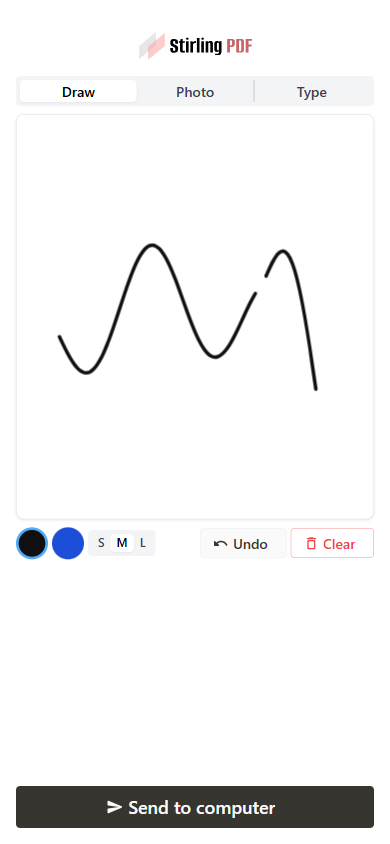 | 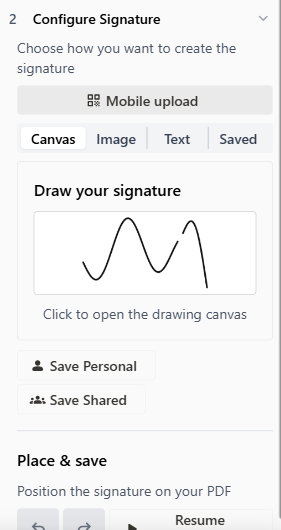 | ## How to test 1. Open the app on an address your phone can reach (not `localhost`), Sign tool → **Mobile upload**, scan the QR. 2. Draw → **Send to computer** → it becomes the active canvas signature and placement is live: click the PDF to place. 3. Photo tab → arrives in the Image source with a preview. Type tab → arrives editable in the Text source. 4. Flags: `enableMobileSignature: false` hides the button; signature still works with the scanner disabled. Verified end-to-end (all three kinds, portrait/landscape/tablet) plus `task frontend:check` and the touched backend tests. --- ## Checklist ### General - [x] I have read the [Contribution Guidelines](https://github.com/Stirling-Tools/Stirling-PDF/blob/main/CONTRIBUTING.md) - [x] I have read the [Stirling-PDF Developer Guide](https://github.com/Stirling-Tools/Stirling-PDF/blob/main/DeveloperGuide.md) (if applicable) - [ ] I have read the [How to add new languages to Stirling-PDF](https://github.com/Stirling-Tools/Stirling-PDF/blob/main/devGuide/HowToAddNewLanguage.md) (if applicable) - [x] I have performed a self-review of my own code - [x] My changes generate no new warnings ### Documentation - [ ] I have updated relevant docs on [Stirling-PDF's doc repo](https://github.com/Stirling-Tools/Stirling-Tools.github.io/blob/main/docs/) (if functionality has heavily changed) - [x] I have read the section [Add New Translation Tags](https://github.com/Stirling-Tools/Stirling-PDF/blob/main/devGuide/HowToAddNewLanguage.md#add-new-translation-tags) (for new translation tags only) ### Translations (if applicable) - [ ] I ran [`scripts/counter_translation.py`](https://github.com/Stirling-Tools/Stirling-PDF/blob/main/docs/counter_translation.md) ### UI Changes (if applicable) - [x] Screenshots or videos demonstrating the UI changes are attached (e.g., as comments or direct attachments in the PR) ### Testing (if applicable) - [x] I have run `task check` to verify linters, typechecks, and tests pass - [x] I have tested my changes locally. Refer to the [Testing Guide](https://github.com/Stirling-Tools/Stirling-PDF/blob/main/DeveloperGuide.md#7-testing) for more details. |
||
|
Ludy
|
35ac74b049 |
fix(ui): improve mobile language selector positioning (#7158)
# Description of Changes - Made the language selector dropdown responsive on mobile devices. - Limited the dropdown width to the available viewport width. - Changed the language grid to use two columns on small screens. - Added a scrollable maximum height to prevent the dropdown from overflowing the settings dialog. - Updated only: - `frontend/editor/src/core/components/shared/LanguageSelector.tsx` - `frontend/editor/src/core/components/shared/LanguageSelector.module.css` The change improves usability on narrow mobile screens, where the previous fixed-width four-column layout caused the language selector to overflow horizontally. before: <img width="1920" height="1032" alt="image" src="https://github.com/user-attachments/assets/85eeca25-4aad-4280-8a11-18db4899deec" /> after: <img width="1920" height="1080" alt="image" src="https://github.com/user-attachments/assets/8b3ccc12-fc1f-4949-88b6-4ca65354a3f9" /> --- ## Checklist ### General - [ ] I have read the [Contribution Guidelines](https://github.com/Stirling-Tools/Stirling-PDF/blob/main/CONTRIBUTING.md) - [ ] I have read the [Stirling-PDF Developer Guide](https://github.com/Stirling-Tools/Stirling-PDF/blob/main/DeveloperGuide.md) (if applicable) - [ ] I have read the [How to add new languages to Stirling-PDF](https://github.com/Stirling-Tools/Stirling-PDF/blob/main/devGuide/HowToAddNewLanguage.md) (if applicable) - [ ] I have performed a self-review of my own code - [ ] My changes generate no new warnings ### Documentation - [ ] I have updated relevant docs on [Stirling-PDF's doc repo](https://github.com/Stirling-Tools/Stirling-Tools.github.io/blob/main/docs/) (if functionality has heavily changed) - [ ] I have read the section [Add New Translation Tags](https://github.com/Stirling-Tools/Stirling-PDF/blob/main/devGuide/HowToAddNewLanguage.md#add-new-translation-tags) (for new translation tags only) ### Translations (if applicable) - [ ] I ran [`scripts/counter_translation.py`](https://github.com/Stirling-Tools/Stirling-PDF/blob/main/docs/counter_translation.md) ### UI Changes (if applicable) - [ ] Screenshots or videos demonstrating the UI changes are attached (e.g., as comments or direct attachments in the PR) ### Testing (if applicable) - [ ] I have run `task check` to verify linters, typechecks, and tests pass - [ ] I have tested my changes locally. Refer to the [Testing Guide](https://github.com/Stirling-Tools/Stirling-PDF/blob/main/DeveloperGuide.md#7-testing) for more details. |
||
|
brios
|
b56e62caec |
refactor(sidebar): Replace custom sidebars (bookmark, attachment etc...) with reusable sidebar component (#7143)
# Description of Changes This helps keeps them consistent and similar/same in regards to design, colour scheme and so on. Generally, we would want to improve upon this, as UX bit lacking here and there e.g., with the button fluidness/conssitency what the button does. Bookmark open sidebar editor, the other two redirects to the page, those may be made more consistent. Changes: * Refactored `AttachmentSidebar`, `BookmarkSidebar`, and `CommentsSidebar` to use the new `SidebarBase` component, replacing custom header, search, and layout code for a more consistent and maintainable UI. * Added search functionality to `CommentsSidebar`, including filtering by comment content and author, and displaying a message when no comments match the search. * Updated search placeholders and empty state messages for attachments, bookmarks, and comments to use translation keys, improving localization and user feedback. ### New <img width="1490" height="1816" alt="image" src="https://github.com/user-attachments/assets/71de659e-388e-4aef-bf03-4c5ee7948a2f" /> ### Old <img width="1574" height="1726" alt="image" src="https://github.com/user-attachments/assets/4604653c-865f-4e75-9737-4b61237efcc6" /> <!-- Please provide a summary of the changes, including: - What was changed - Why the change was made - Any challenges encountered Closes #(issue_number) --> --- ## Checklist ### General - [X] I have read the [Contribution Guidelines](https://github.com/Stirling-Tools/Stirling-PDF/blob/main/CONTRIBUTING.md) - [X] I have read the [Stirling-PDF Developer Guide](https://github.com/Stirling-Tools/Stirling-PDF/blob/main/DeveloperGuide.md) (if applicable) - [ ] I have read the [How to add new languages to Stirling-PDF](https://github.com/Stirling-Tools/Stirling-PDF/blob/main/devGuide/HowToAddNewLanguage.md) (if applicable) - [X] I have performed a self-review of my own code - [X] My changes generate no new warnings ### Documentation - [ ] I have updated relevant docs on [Stirling-PDF's doc repo](https://github.com/Stirling-Tools/Stirling-Tools.github.io/blob/main/docs/) (if functionality has heavily changed) - [ ] I have read the section [Add New Translation Tags](https://github.com/Stirling-Tools/Stirling-PDF/blob/main/devGuide/HowToAddNewLanguage.md#add-new-translation-tags) (for new translation tags only) ### Translations (if applicable) - [ ] I ran [`scripts/counter_translation.py`](https://github.com/Stirling-Tools/Stirling-PDF/blob/main/docs/counter_translation.md) ### UI Changes (if applicable) - [X] Screenshots or videos demonstrating the UI changes are attached (e.g., as comments or direct attachments in the PR) ### Testing (if applicable) - [X] I have run `task check` to verify linters, typechecks, and tests pass - [X] I have tested my changes locally. Refer to the [Testing Guide](https://github.com/Stirling-Tools/Stirling-PDF/blob/main/DeveloperGuide.md#7-testing) for more details. |
||
|
James Brunton
|
998e851130 |
Support using Convert in Pipelines (#7290)
# Description of Changes Convert tool is currently unavailable in pipelines because it's a very complex tool so conversions to and from the backend types was previously skipped for time. This PR redesigns the tool setup so that it can be used in pipelines and the existing editor/automate uses. There's probably more work to do one day to have a proper second look at Convert because the rest of the code has changed so much since it was first written, but this adds a bit of type safety to it and at least adopts the bidirectional tool APIs so we're moving in the right direction. <img width="1263" height="581" alt="image" src="https://github.com/user-attachments/assets/58d64894-05a4-41e0-a840-3202dd8e0e39" /> <img width="1244" height="578" alt="image" src="https://github.com/user-attachments/assets/79285c2d-6777-4df7-a8fa-1453cb8a8258" /> <img width="1249" height="584" alt="image" src="https://github.com/user-attachments/assets/8ced6bb5-817f-4911-9ada-c3707a777243" /> <img width="1245" height="510" alt="image" src="https://github.com/user-attachments/assets/d01a083c-fb76-4c8c-a526-99613afc2608" /> |
||
|
Anthony Stirling
|
8db44ddbaf |
feat(policies): default Security policy to run on export (#7407)
# Description of Changes default Security policy to run on export and not import --- ## Checklist ### General - [ ] I have read the [Contribution Guidelines](https://github.com/Stirling-Tools/Stirling-PDF/blob/main/CONTRIBUTING.md) - [ ] I have read the [Stirling-PDF Developer Guide](https://github.com/Stirling-Tools/Stirling-PDF/blob/main/DeveloperGuide.md) (if applicable) - [ ] I have read the [How to add new languages to Stirling-PDF](https://github.com/Stirling-Tools/Stirling-PDF/blob/main/devGuide/HowToAddNewLanguage.md) (if applicable) - [ ] I have performed a self-review of my own code - [ ] My changes generate no new warnings ### Documentation - [ ] I have updated relevant docs on [Stirling-PDF's doc repo](https://github.com/Stirling-Tools/Stirling-Tools.github.io/blob/main/docs/) (if functionality has heavily changed) - [ ] I have read the section [Add New Translation Tags](https://github.com/Stirling-Tools/Stirling-PDF/blob/main/devGuide/HowToAddNewLanguage.md#add-new-translation-tags) (for new translation tags only) ### Translations (if applicable) - [ ] I ran [`scripts/counter_translation.py`](https://github.com/Stirling-Tools/Stirling-PDF/blob/main/docs/counter_translation.md) ### UI Changes (if applicable) - [ ] Screenshots or videos demonstrating the UI changes are attached (e.g., as comments or direct attachments in the PR) ### Testing (if applicable) - [ ] I have run `task check` to verify linters, typechecks, and tests pass - [ ] I have tested my changes locally. Refer to the [Testing Guide](https://github.com/Stirling-Tools/Stirling-PDF/blob/main/DeveloperGuide.md#7-testing) for more details. |
||
|
Anthony Stirling
|
e6680c4cf5 |
fix(auth): remove signup page from self-hosted builds (#7406)
# Description of Changes remove signup page from self-hosted builds since all signups are either default or done via admins --- ## Checklist ### General - [ ] I have read the [Contribution Guidelines](https://github.com/Stirling-Tools/Stirling-PDF/blob/main/CONTRIBUTING.md) - [ ] I have read the [Stirling-PDF Developer Guide](https://github.com/Stirling-Tools/Stirling-PDF/blob/main/DeveloperGuide.md) (if applicable) - [ ] I have read the [How to add new languages to Stirling-PDF](https://github.com/Stirling-Tools/Stirling-PDF/blob/main/devGuide/HowToAddNewLanguage.md) (if applicable) - [ ] I have performed a self-review of my own code - [ ] My changes generate no new warnings ### Documentation - [ ] I have updated relevant docs on [Stirling-PDF's doc repo](https://github.com/Stirling-Tools/Stirling-Tools.github.io/blob/main/docs/) (if functionality has heavily changed) - [ ] I have read the section [Add New Translation Tags](https://github.com/Stirling-Tools/Stirling-PDF/blob/main/devGuide/HowToAddNewLanguage.md#add-new-translation-tags) (for new translation tags only) ### Translations (if applicable) - [ ] I ran [`scripts/counter_translation.py`](https://github.com/Stirling-Tools/Stirling-PDF/blob/main/docs/counter_translation.md) ### UI Changes (if applicable) - [ ] Screenshots or videos demonstrating the UI changes are attached (e.g., as comments or direct attachments in the PR) ### Testing (if applicable) - [ ] I have run `task check` to verify linters, typechecks, and tests pass - [ ] I have tested my changes locally. Refer to the [Testing Guide](https://github.com/Stirling-Tools/Stirling-PDF/blob/main/DeveloperGuide.md#7-testing) for more details. |
||
|
stirlingbot[bot]
|
bbaff8d6c4 |
Sync portal docs from docs repo (#7408)
Auto-generated by stirlingbot[bot]. Regenerates `frontend/editor/src/portal/generated/docsManifest.json` from the Stirling docs repo via `npm run docs:sync`. Signed-off-by: stirlingbot[bot] <stirlingbot[bot]@users.noreply.github.com> Co-authored-by: stirlingbot[bot] <195170888+stirlingbot[bot]@users.noreply.github.com> |
||
|
EthanHealy01
|
c929386442 |
Record policy-run failures as durable, actionable events (Review Flow PR 1) (#7269)
# Description of Changes PR 1 of the failure-notification work: a durable, team-scoped record of **why a policy run failed**, surfaced in the portal with the triage actions each failure allows. Today a failed policy run is not quite invisible, but it is unusable: the ledger marks the file `ERROR`, and the audit aspect keeps the exception message and status code. Nothing classifies either one, nothing surfaces them, and neither offers a next step. If the file came from a folder, bucket or webhook there is also no user watching, so nobody learns it never made it through. This adds the record and the read surface; the remediation that acts on documents comes later (see below). ## What this does **A failure kind registry as data.** `FailureKind` describes what can go wrong: a stable wire id, i18n keys, an English fallback, and four facets the review surface needs (`Stage`, `Severity`, `Remedy`, `Scope`). It is shaped like the existing `ExceptionUtils.ErrorCode` and *links* to that vocabulary rather than replacing it. **Classification off structured codes, not message matching.** Policy steps dispatch over loopback HTTP, so a tool's 4xx arrives as a `RestClientResponseException` whose body is the Problem Details document carrying `errorCode`. `FailureClassifier` reads that. Anything unrecognised becomes `UNKNOWN`, which is the point: every failed run gets an addressable record from day one, and which kinds to promote next is answered by production frequency rather than guesswork. **Actions declared by a kind, implemented as beans.** A kind lists the `FailureActionId`s it offers; behaviour lives in `FailureAction` beans resolved by id — the idiom this codebase already uses for `InputSource`, `PolicyOutputSink` and `PolicyTrigger`. A kind cannot be sent an action it never declared (400), so an incoherent pairing is unreachable rather than merely unrendered. A new kind ships as a registry entry plus copy: no new endpoint, no UI change. **Repeat folding.** Recording folds a genuine repeat into the existing incident instead of inserting again, keyed on `(team_id, dedup_key)`. That matters for a snapshot-mode source that re-lists every file on each sweep: the same broken file is one incident, not one per sweep. Distinct files keep distinct rows. The unique constraint is enforced by the database, and a writer that loses the insert race folds into the winner's row. One granularity caveat worth naming: nothing populates `file_id` in this PR, so every row has it NULL. A FILE-scoped kind therefore dedups on `policy + run` rather than `policy + file`. That still yields one row per document for the sources shipped here, because the folder, S3 and webhook sources each start one run per file; it stops holding as soon as a single run carries several documents, which is why editor-origin reporting (item 3 below) populates `file_id`. **No document identity is stored.** No file name, no content. `fileId` is an opaque reference only the owner's own client can resolve locally. `detail` keeps the raw message (the only diagnostic an `UNKNOWN` failure has) with anything path- or filename-shaped stripped on the way in, capped at 2,000 characters. `PolicyExecutor`'s type-mismatch message now reports the *extension* rather than the filename, since that message becomes the stored `detail`. **Access.** Reads and triage are leader-only, gated exactly the way `PolicyController` gates policy editing, with the single-user carve-out when login is disabled. Every read and write is scoped to the caller's own team from the authenticated principal — there is no team parameter on the API. Self-hosted needs no migration: the table is created from the entity by `ddl-auto=update`, as with every other table. ## What this does not do yet - **Actions are incident dispositions, not document dispositions.** Acknowledge and Dismiss change how a failure is displayed and touch nothing else — not the document, not the processed-file ledger, not the run, not any output destination. That is what makes them safe to offer against `UNKNOWN`, and why there is no Approve/Release yet. - **Two kinds only.** `INPUT_PASSWORD_PROTECTED` and `UNKNOWN`. Everything else classifies as `UNKNOWN` and shows its raw message. - **Editor-origin failures are not reported.** Every row is `PROCESSOR`. `FailureOrigin.EDITOR` and `API` exist in the enum but nothing writes them. - **The list is dev-only for now.** The section renders behind `import.meta.env.DEV`, so it ships in no production bundle. The endpoints are live and gated. - **No retention or per-team cap** on `file_run_events`. Tracked separately. - **No suspend-and-prompt.** `PolicyInputRequiredException` and the engine's `suspend()` exist but nothing throws it, so a run cannot pause to ask for a password today. - **SaaS needs a migration** in `Stirling-PDF-SaaS` (`CREATE TABLE IF NOT EXISTS stirling_pdf.file_run_events`), per the convention documented at `app/saas/src/main/resources/application-saas.properties:21`. ## What follows in later PRs 1. **Map the remaining error codes to specific kinds** — corrupted file, OCR unavailable, output destination unreachable, entitlement refusals, and so on — each with its own copy and its own action set, replacing today's `UNKNOWN` catch-all with a named notification in the review UI. 2. **Real remediation actions** attached to those kinds: fix (supply a password and resume), skip (drop this file, continue the batch), and decline (reject an incoming file outright), acting on the held document rather than only on the incident row. This is where the suspend-and-prompt path gets wired. 3. **Editor-origin reporting**, so a failure a user hits in the editor lands in the same queue as one from a bucket. 4. **The user-facing review surface**: notifications with a sticky review section, per-file badges, and an export gate, with the dev-only list here replaced by the real thing. ## How to test Needs a SaaS or proprietary build with login enabled, and an account that leads a team. 1. Create a policy in the Processor with any step (Auto-redact is fine) and a source you can drop files into. 2. Upload two files that will fail it: **a password-protected PDF**, and **a corrupted PDF** (truncate a valid one, or rename a `.csv` to `.pdf`). 3. Let the policy run and fail on both. 4. Go to the portal's **Documents** view and scroll to **Failures** (dev builds only). Expect two rows: - **Password-protected document** — classified from `E004`, with the kind's own labels **"I'll unlock this"** and **"Skip this file"** rather than generic wording. - **Unrecognised failure** — the corrupted file, classified `UNKNOWN` (`E001` is not claimed by a kind yet), showing its raw message with generic **Acknowledge** / **Dismiss**. Neither row contains a file name anywhere, including in the raw message. Press **Show raw JSON** to read exactly what the server returned. Acting on a row transitions it and comes back with both buttons disabled and a reason. Re-running the same batch increments the occurrence count on the existing rows rather than adding new ones; two *different* password-protected files produce two separate rows. --- ## Checklist ### General - [ ] I have read the [Contribution Guidelines](https://github.com/Stirling-Tools/Stirling-PDF/blob/main/CONTRIBUTING.md) - [ ] I have read the [Stirling-PDF Developer Guide](https://github.com/Stirling-Tools/Stirling-PDF/blob/main/DeveloperGuide.md) (if applicable) - [ ] I have read the [How to add new languages to Stirling-PDF](https://github.com/Stirling-Tools/Stirling-PDF/blob/main/devGuide/HowToAddNewLanguage.md) (if applicable) - [ ] I have performed a self-review of my own code - [ ] My changes generate no new warnings ### Documentation - [ ] I have updated relevant docs on [Stirling-PDF's doc repo](https://github.com/Stirling-Tools/Stirling-Tools.github.io/blob/main/docs/) (if functionality has heavily changed) - [ ] I have read the section [Add New Translation Tags](https://github.com/Stirling-Tools/Stirling-PDF/blob/main/devGuide/HowToAddNewLanguage.md#add-new-translation-tags) (for new translation tags only) ### Translations (if applicable) - [ ] I ran [`scripts/counter_translation.py`](https://github.com/Stirling-Tools/Stirling-PDF/blob/main/docs/counter_translation.md) ### UI Changes (if applicable) - [ ] Screenshots or videos demonstrating the UI changes are attached (e.g., as comments or direct attachments in the PR) ### Testing (if applicable) - [ ] I have run `task check` to verify linters, typechecks, and tests pass |
||
|
James Brunton
|
0ff4ef629c |
New Pipeline UI redesign (#7202)
# Description of Changes Supersedes #7144. Redesign the Processor New Pipeline page to use a graph-based interface. Far from perfect at this stage but I'm pretty happy with the interactions on the graph itself. The bar at the top needs some work to make it prettier and more clear what everything is for, but I'd rather get this in and do changes in a follow-up PR because this is big enough on its own and leaves us better than where we were before. <img width="1270" height="598" alt="image" src="https://github.com/user-attachments/assets/fa16f7d0-058d-4929-83a2-3c8e42859970" /> <img width="1511" height="788" alt="image" src="https://github.com/user-attachments/assets/bbeb411f-dbf9-43c9-9b34-28b3a5917e5b" /> <img width="1261" height="754" alt="image" src="https://github.com/user-attachments/assets/380fca1f-eed6-44fe-819d-c10598472583" /> <img width="1256" height="653" alt="image" src="https://github.com/user-attachments/assets/59e9a673-b026-43a9-b7f1-ebaf89236df2" /> <img width="1216" height="726" alt="image" src="https://github.com/user-attachments/assets/b34ae323-6842-44d5-b054-eacf08647ad7" /> |
||
|
ConnorYohandReece Browne
|
35a861f4f8 |
feat(editor): move endpoint availability onto TanStack Query (#7285)
# Description of Changes > Stacked on #7264, sibling of #7283. Independent of #7283 — the only overlap is two additive lines in `core/query/keys.ts` and `core/api/config.ts`. Either can merge first. ## The problem `useEndpointConfig` kept its own cache: a module-level `globalFetchDone` boolean, a mutable `globalEndpointCache` object, and a `resetGlobalCache()` called from the JWT listener. Which consumer mounted first decided who paid for the request, and nothing invalidated it except a page reload. ## End state One shared query for the whole availability map; each of the 12 consumers projects the endpoints it asked for. **251 lines to 101**, same return shape, no consumer changes. | | Before | After | |---|---|---| | Cross-consumer cache | `globalFetchDone` + mutable module object | query key | | Invalidation | `resetGlobalCache()` mutating that object | `invalidateQueries` | | Per-endpoint check | own `useState` triple | query keyed by endpoint | Behaviour kept deliberately: - **Unknown endpoints and any failure still read as enabled.** This fires before auth settles, and disabling every tool on a hiccup is worse than letting one call fail later. - **`retry` is off for the availability map.** The fallback *is* the answer, so retrying only doubles a request every logged-out visitor makes on load. ## Desktop is untouched `desktop/hooks/useEndpointConfig.ts` shadows this module entirely — no shared code, so core converting doesn't affect it and there's no half-migrated state. It's 482 lines of orchestration rather than fetching: dependency-ready gating, `tauriBackendService` and `selfHostedServerMonitor` subscriptions, a 2.5s timeout retry for backend startup, a legacy `?endpoints=` fallback for old servers, and SaaS-routing optimism that rewrites disabled endpoints to enabled. It also has no test coverage to convert against, and it decides whether tools appear at all in the desktop app. That's a different job from this one and wants its own review. Next PR. ## Testing 9 new tests: projection onto the requested subset, one request across consumers, unknown-endpoint fallback, failure fallback with no retry, empty-list no-fetch, JWT invalidation, and the three single-endpoint cases. `task frontend:check` green: 1677 tests across 192 files, typecheck on all five flavours, eslint, dpdm, prettier. Co-authored-by: Reece Browne <74901996+reecebrowne@users.noreply.github.com> |
||
|
Anthony Stirling
|
59ed4f5fd1 |
Fix automate unrunnable tools (#7311)
# Description of Changes Fix automate unrunnable tools ## Problem - Remove Image failed in Automate with `Tool operation not supported: removeImage` - Its registry entry had `operationConfig: undefined` even though the config existed and was already tested - The Automate picker only filtered on `supportsAutomate`, never on `operationConfig` — so broken tools were selectable and failed only at run time ## Fixes - Wire up `removeImage` and `pageLayout` operation configs (both already existed, just never registered) - Exclude `validateSignature` (report tool, not on the operationConfig seam) and `scannerEffect` (no frontend implementation) via `supportsAutomate: false` - Picker now also filters on `operationConfig`, so this class of bug can't reach users again - `overlay-pdfs` returns 400 instead of 500 when overlay files or mode are missing - Fix `new URL().pathname` Windows path bug that stopped 2 test suites from loading --- ## Checklist ### General - [ ] I have read the [Contribution Guidelines](https://github.com/Stirling-Tools/Stirling-PDF/blob/main/CONTRIBUTING.md) - [ ] I have read the [Stirling-PDF Developer Guide](https://github.com/Stirling-Tools/Stirling-PDF/blob/main/DeveloperGuide.md) (if applicable) - [ ] I have read the [How to add new languages to Stirling-PDF](https://github.com/Stirling-Tools/Stirling-PDF/blob/main/devGuide/HowToAddNewLanguage.md) (if applicable) - [ ] I have performed a self-review of my own code - [ ] My changes generate no new warnings ### Documentation - [ ] I have updated relevant docs on [Stirling-PDF's doc repo](https://github.com/Stirling-Tools/Stirling-Tools.github.io/blob/main/docs/) (if functionality has heavily changed) - [ ] I have read the section [Add New Translation Tags](https://github.com/Stirling-Tools/Stirling-PDF/blob/main/devGuide/HowToAddNewLanguage.md#add-new-translation-tags) (for new translation tags only) ### Translations (if applicable) - [ ] I ran [`scripts/counter_translation.py`](https://github.com/Stirling-Tools/Stirling-PDF/blob/main/docs/counter_translation.md) ### UI Changes (if applicable) - [ ] Screenshots or videos demonstrating the UI changes are attached (e.g., as comments or direct attachments in the PR) ### Testing (if applicable) - [ ] I have run `task check` to verify linters, typechecks, and tests pass - [ ] I have tested my changes locally. Refer to the [Testing Guide](https://github.com/Stirling-Tools/Stirling-PDF/blob/main/DeveloperGuide.md#7-testing) for more details. |
||
|
Reece Browne
|
7bf18cc4c7 |
Storybook: render off the app's real theme CSS, stop hardcoding story colours, and gate a11y in dark mode too (#7187)
## What Makes Storybook render components with the same CSS the app gives them. - The preview loaded the token primitives but **not the editor's semantic token layer** (`styles/theme.css`), so components styled on those variables rendered unthemed — three onboarding stories were importing it by hand to stop their modal surfaces rendering transparent. It's now loaded in the preview and the workarounds are gone. - **Portal stories render inside the `.portal-scope` wrapper** PortalApp mounts, so the portal's scoped reset and typography apply to them exactly as in the app — and, deliberately, to nothing else. - The folder stories invented their own hex colours, two of which aren't values the app's `FOLDER_COLOR_PALETTE` can produce. They now use the palette, so they can't drift from what a user can actually pick. Deliberately does **not** load `tailwind.css` — tailwind is on its way out of the editor, so matching the token layer alone is the target state. ## Story colours route through the tokens, enforced Stories were exempt from the `code-colors` lint, and it showed: hardcoded hexes for surfaces the tokens already name (chat bubbles, borders, demo backgrounds), `var(--x, #hex)` fallbacks that mask a renamed token by silently painting the stale colour, and mocked category accents for which real `--color-cat-*` tokens exist. - Styling literals now use tokens; the dead fallbacks are stripped. - The stories exemption is removed from `theme-lint`, so this can't regress. - Colours that are **the datum itself** — `ColorInput` values, signature ink, per-policy accents, brand-mark swatches — stay literal via `theme-allow-color`, hoisted to named consts so the exemption and its reason sit together. A practical side effect: stories styled on tokens actually respond to the dark-mode toolbar toggle, which is what makes a dark-theme a11y pass meaningful later. ## The a11y gate now runs dark as well as light Contrast is most of what axe reports and it is theme-dependent, so a light-only gate left half the surface unmeasured — and it only becomes measurable at all once the tokens above actually flip. `SCAN_THEME=dark` pins the theme for a whole scan run, every a11y task runs both themes, and each theme has its own baseline: - **light** re-recorded against the themed rendering (the old baseline measured colours the app never shows): 831 stories with violations - **dark** recorded for the first time: 798 stories with violations, 980 story-rule pairs, zero render failures across the full sweep Verified end to end: dark scans measure against dark surfaces (`#18181b` vs `#ffffff`), both baselines self-check clean, and a live scan of stories that changed on main after recording passes both gates. Nightly's timeout doubles for the second sweep. ## Testing Typecheck (all variants), ESLint and Prettier pass. Onboarding, folder, portal and control stories render in the browser scan (39/39) with the per-story CSS imports removed; every story touched by the colour sweep renders too (58/58). `task frontend:lint:colors` passes with stories included. |
||
|
James Brunton
|
af5f54274d |
Add defaults to calculations for ToolIO (#7289)
# Description of Changes Currently when calculating the output file type for some tools, the system will get it wrong because it doesn't know about what the default parameters in tools are, so if it doesn't have a value for some key, it'll just bail out and say "it might not be compatible". This PR adds logic to `ToolIO` to read the default values set for the parameters if the tool has `ToolIOCase`s and takes them into account when figuring out the output type. I've built it with horrible Java reflection magic to avoid having to specify the default for params twice, which will make it impossible for the defaults to disagree with each other. This just runs once at startup so there's negligible performance impact. The change is easily tested with Change Parameters, which is just `add-password` behind the scenes but with the password params omitted (so Change Password is always PDF->PDF, never encrypted like Add Password). Also (somewhat hackily) fixes a bug I noticed where saving a Change Permissions step then leaving and returning to the pipeline will cause the step to be reloaded as Add Password. I've added a system to disambiguate tools which share the same endpoint (which is only these two currently). ## Currently <img width="455" height="135" alt="image" src="https://github.com/user-attachments/assets/c8867d6a-599b-4f21-a2db-4a1b6ac22d73" /> ## Now <img width="415" height="122" alt="image" src="https://github.com/user-attachments/assets/bd8d1bab-f00a-421b-8c91-5af0d2ad5335" /> |
||
|
James Brunton
|
cfaf777f2b |
Fix more any type usages in frontend code (#7334)
# Description of Changes Continued effort towards removing all uses of the any type in our frontend code (last PR was #7326). This PR fixes 7 more folders and removes them from the exclude list. All of them were localised within the folder in the exclude list so again were pretty easy to fix. |
||
|
Anthony Stirling
|
faba9f53ea |
Update all translations (#7380)
# Description of Changes Update all translations --- ## Checklist ### General - [ ] I have read the [Contribution Guidelines](https://github.com/Stirling-Tools/Stirling-PDF/blob/main/CONTRIBUTING.md) - [ ] I have read the [Stirling-PDF Developer Guide](https://github.com/Stirling-Tools/Stirling-PDF/blob/main/DeveloperGuide.md) (if applicable) - [ ] I have read the [How to add new languages to Stirling-PDF](https://github.com/Stirling-Tools/Stirling-PDF/blob/main/devGuide/HowToAddNewLanguage.md) (if applicable) - [ ] I have performed a self-review of my own code - [ ] My changes generate no new warnings ### Documentation - [ ] I have updated relevant docs on [Stirling-PDF's doc repo](https://github.com/Stirling-Tools/Stirling-Tools.github.io/blob/main/docs/) (if functionality has heavily changed) - [ ] I have read the section [Add New Translation Tags](https://github.com/Stirling-Tools/Stirling-PDF/blob/main/devGuide/HowToAddNewLanguage.md#add-new-translation-tags) (for new translation tags only) ### Translations (if applicable) - [ ] I ran [`scripts/counter_translation.py`](https://github.com/Stirling-Tools/Stirling-PDF/blob/main/docs/counter_translation.md) ### UI Changes (if applicable) - [ ] Screenshots or videos demonstrating the UI changes are attached (e.g., as comments or direct attachments in the PR) ### Testing (if applicable) - [ ] I have run `task check` to verify linters, typechecks, and tests pass - [ ] I have tested my changes locally. Refer to the [Testing Guide](https://github.com/Stirling-Tools/Stirling-PDF/blob/main/DeveloperGuide.md#7-testing) for more details. |
||
|
Ludy
|
c1275763af |
chore(i18n): localize hardcoded UI strings across editor components (#7172)
# Description of Changes This PR replaces multiple hardcoded English UI strings with translation keys to improve localization consistency throughout the editor. ### What was changed - Added new translation entries for: - AI chat panel header and empty state - Generic dropdown placeholders and empty states - Generic input placeholder (`Enter value`) - Tool renderer "tool not found" message - Signature pen size placeholder - Updated shared components to use translated fallback placeholders instead of hardcoded English text: - `DropdownListWithFooter` - `EditableSecretField` - `GroupedFormatDropdown` - `LanguagePicker` - `PenSizeSelector` - Localized the AI chat panel: - Assistant title - Empty state message - Input placeholder - Localized the fallback error message displayed when a tool cannot be resolved. ### Why the change was made Several shared UI components and the AI assistant interface contained hardcoded English strings, preventing proper localization and creating an inconsistent multilingual experience. Moving these strings into the translation system ensures they can be translated alongside the rest of the application and provides reusable defaults for shared components. --- ## Checklist ### General - [ ] I have read the [Contribution Guidelines](https://github.com/Stirling-Tools/Stirling-PDF/blob/main/CONTRIBUTING.md) - [ ] I have read the [Stirling-PDF Developer Guide](https://github.com/Stirling-Tools/Stirling-PDF/blob/main/DeveloperGuide.md) (if applicable) - [ ] I have read the [How to add new languages to Stirling-PDF](https://github.com/Stirling-Tools/Stirling-PDF/blob/main/devGuide/HowToAddNewLanguage.md) (if applicable) - [ ] I have performed a self-review of my own code - [ ] My changes generate no new warnings ### Documentation - [ ] I have updated relevant docs on [Stirling-PDF's doc repo](https://github.com/Stirling-Tools/Stirling-Tools.github.io/blob/main/docs/) (if functionality has heavily changed) - [ ] I have read the section [Add New Translation Tags](https://github.com/Stirling-Tools/Stirling-PDF/blob/main/devGuide/HowToAddNewLanguage.md#add-new-translation-tags) (for new translation tags only) ### Translations (if applicable) - [ ] I ran [`scripts/counter_translation.py`](https://github.com/Stirling-Tools/Stirling-PDF/blob/main/docs/counter_translation.md) ### UI Changes (if applicable) - [ ] Screenshots or videos demonstrating the UI changes are attached (e.g., as comments or direct attachments in the PR) ### Testing (if applicable) - [ ] I have run `task check` to verify linters, typechecks, and tests pass - [ ] I have tested my changes locally. Refer to the [Testing Guide](https://github.com/Stirling-Tools/Stirling-PDF/blob/main/DeveloperGuide.md#7-testing) for more details. |
||
|
kastenherri
|
3260f5415d |
localization/formFill: Improve german translation and add localization (#7255)
# Description of Changes The formFill tool name and description as well as the notification popup for forms were missing their german translations. There were also some hardcoded text elements in the UI. Added translations of formFill-related tags and new tags and translation method for hardcoded strings. <!-- Please provide a summary of the changes, including: - What was changed - Why the change was made - Any challenges encountered Closes #(issue_number) --> --- ## Checklist ### General - [x] I have read the [Contribution Guidelines](https://github.com/Stirling-Tools/Stirling-PDF/blob/main/CONTRIBUTING.md) - [x] I have read the [Stirling-PDF Developer Guide](https://github.com/Stirling-Tools/Stirling-PDF/blob/main/DeveloperGuide.md) (if applicable) - [x] I have read the [How to add new languages to Stirling-PDF](https://github.com/Stirling-Tools/Stirling-PDF/blob/main/devGuide/HowToAddNewLanguage.md) (if applicable) - [x] I have performed a self-review of my own code - [x] My changes generate no new warnings ### Documentation - [x] I have read the section [Add New Translation Tags](https://github.com/Stirling-Tools/Stirling-PDF/blob/main/devGuide/HowToAddNewLanguage.md#add-new-translation-tags) (for new translation tags only) ### Translations (if applicable) - [ ] I ran [`scripts/counter_translation.py`](https://github.com/Stirling-Tools/Stirling-PDF/blob/main/docs/counter_translation.md) ### UI Changes (if applicable) - [ ] Screenshots or videos demonstrating the UI changes are attached (e.g., as comments or direct attachments in the PR) ### Testing (if applicable) - [x] I have run `task check` to verify linters, typechecks, and tests pass - [x] I have tested my changes locally. Refer to the [Testing Guide](https://github.com/Stirling-Tools/Stirling-PDF/blob/main/DeveloperGuide.md#7-testing) for more details. --------- Signed-off-by: Carsten Drewes <c.drewes@stud.uni-hannover.de> |
||
|
albanobattistella
|
0286c716de | Updated Italian translation (#7353) | ||
|
stirlingbot[bot]
|
4ed2f15122 |
Update Frontend 3rd Party Licenses (#7329)
Auto-generated by stirlingbot[bot] This PR updates the frontend license report based on changes to package.json dependencies. Signed-off-by: stirlingbot[bot] <stirlingbot[bot]@users.noreply.github.com> Co-authored-by: stirlingbot[bot] <195170888+stirlingbot[bot]@users.noreply.github.com> |
||
|
James Brunton
|
37a48aa7a7 |
Replace ESLint and dpdm with Oxlint (#7330)
# Description of Changes Smaller scope than #6689 to try and get this finished. Replace ESLint and dpdm with Oxlint, a TS linter written in Rust so its performance is dramatically better than the existing tools we use. ## Speed improvement - Current ESLint run: 13.76s - Current dpdm run: 3.59s - Total time: 17.35s - New Oxlint run: 0.90s So Oxlint is about a 20x speed improvement. ## Differences When I last tried to do this, we could recreate our rules identically with Oxlint, but that's not true any more. Oxlint has no current equivalent for ESLint's `no-restricted-syntax` rule, which we were using to ban usages of `<button>` and stuff in specific components to try and encourage them to use our shared UI. This is a very recent addition to our linting config, and personally I'm willing to drop it for now at least. We can still ban specific imports in files, so the files which we were trying to enforce shared UI will still ban directly importing Mantine, so that'll probably be most of the cases still caught, but I think there are other ways we can encourage using the shared UI beyond just using the linter for it. I did try building a custom TS rule for it and it only slowed it down a tiny bit (it took 1.1s) but it had to be built on an unreleased alpha API which just sounds like a maintenance headache we don't need to deal with for a rule that we don't really need. |
||
|
James Brunton
|
408f9ef148 |
Fix any type usages in frontend code (#7326)
# Description of Changes Continued effort towards removing all uses of the `any` type in our frontend code. This PR fixes 10 more folders and removes them from the exclude list. All of them were really simple fixes. |
||
|
EthanHealy01andAnthony Stirling
|
cff6549a40 |
fix(frontend): keep file persistence working when IndexedDB refuses blobs (#7314)
# Description of Changes Fixes the WebKit nightly failures ([run 31067620195](https://github.com/Stirling-Tools/Stirling-PDF/actions/runs/31067620195/attempts/1)): 8 tests failed on `stubbed-webkit` only, and every one of them logs the same thing in its trace: ``` IndexedDB add error: UnknownError: Error preparing Blob/File data to be stored in object store ``` ## What broke `storeStirlingFile` stores the `File` itself in IndexedDB, so multi-GB uploads are persisted by reference and never materialize in JS memory. That came in with #7175 (`data: stirlingFile` replacing `data: await stirlingFile.arrayBuffer()`), which is a real memory win and worth keeping. WebKit refuses blob values whenever it can't write the blob's backing file, and rejects the request with the error above. The rejection was only `console.error`d, so on WebKit **no upload ever persisted**, and everything that reads the bytes back behaved as if the upload never happened: - `file-state-across-tools` — file gone after navigating; the sidebar shows "No files yet" - `compare` — `FileSelectorPicker: upload failed`, so the slot stays `data-slot-state="empty"` - `classification-grouping` / `classification-heuristic-upload` — the label backfill and thumbnails read from IDB (`not in IndexedDB (likely remote-only stub)`), so files land in "Recent" with no category headers Chromium and Firefox store blobs fine, and PR CI only runs the `stubbed` (chromium) project, so nightly was the only gate that could catch it. ## The fix Try the blob first, keep a fallback: - `storeStirlingFile`'s `add` is extracted into `addFileRecord` so it can run twice - if the value was a Blob and the failure is `UnknownError` / `DataCloneError`, re-add the record with an `ArrayBuffer` copy and set `blobValuesSupported = false`, so later files in that session go straight to the copy path instead of losing the blob attempt every time - deliberately narrow: `QuotaExceededError` and `ConstraintError` still propagate, because a copy would fail the same way and retrying would hide the real cause - dropped two internal `console.error`s: every caller already reports (`addFiles`, `FileSelectorPicker`, `zipFileService` collects into `result.errors`), so they were duplicate noise Every writer goes through `storeStirlingFile` (uploads, the file picker, zip extraction, folder automation, `IndexedDBContext`), so this one seam covers all of them. The read paths already accept either shape (`new Blob([record.data], ...)`). Net effect: Chromium and Firefox keep the no-copy path; engines that refuse blobs degrade to the pre-#7175 behaviour instead of silently losing files. On such an engine a very large file can still exhaust renderer memory — the fallback warns about exactly that. Fixing that properly means chunked storage, which is out of scope here. ## Verification Reproduced and confirmed the cause by A/B on a branch that predates #7175: as-is 8/8 pass on WebKit, and applying only #7175's `data: stirlingFile` line reproduces the exact CI failure set. | Check | Result | |---|---| | `stubbed-webkit`: the 8 nightly failures + `classification-heuristic-upload` | 9 passed | | `stubbed-webkit`: `files-page`, `page-editor-rotation`, `encrypted-pdf-unlock` | 32 passed, 1 skipped | | `stubbed` (chromium): the same specs + `files-page` | 35 passed, 1 skipped | | Frontend unit suite | 210 files, 1797 passed | | `typecheck:core`, `typecheck:proprietary`, eslint, prettier | clean | New unit coverage in `fileStorage.blobFallback.test.ts` pins the contract over `fake-indexeddb` with `add` instrumented to count blob vs copy attempts: blob path when accepted, blob-then-copy when refused (and readable back), one attempt only for later files, and quota not retried. --- ## Checklist ### General - [x] I have read the [Contribution Guidelines](https://github.com/Stirling-Tools/Stirling-PDF/blob/main/CONTRIBUTING.md) - [x] I have read the [Stirling-PDF Developer Guide](https://github.com/Stirling-Tools/Stirling-PDF/blob/main/DeveloperGuide.md) (if applicable) - [x] I have performed a self-review of my own code - [x] My changes generate no new warnings ### Testing (if applicable) - [x] Frontend typecheck (core + proprietary), eslint, prettier, the unit suite, and the affected Playwright specs on chromium and webkit all pass Co-authored-by: Anthony Stirling <77850077+Frooodle@users.noreply.github.com> |
||
|
Matheus SaitoandAnthony Stirling
|
fa11034a99 |
Added Measurement Scale Support for Architectural Drawings (#6121) (#6215)
Fix #6121 # Description of Changes <!-- Please provide a summary of the changes, including: - What was changed - Why the change was made - Any challenges encountered Closes (#6121 ) --> This PR expands the viewer ruler/measurement tool with real-world scale support. Users can now apply preset scales, define custom scales, calibrate a scale by drawing a reference measurement and entering its known real-world distance, and view measurements with scaled real-world values. It also refactors PDF `/Measure` and `/VP` scale extraction out of `EmbedPdfViewer` into a dedicated utility, centralizes ruler state management in a dedicated hook, persists ruler measurements and selected scales per file during the browser session, remembers the last calibration unit locally, and updates the ruler overlay so measurements remain aligned with the PDF page during rotation and scrolling. **New Files** - `RulerMeasurementLayer.tsx` - Renders ruler measurements in the SVG overlay, including lines, points, labels, page/scaled values, delete controls, live previews, clear controls, and label visibility modes. - `RulerScaleSettingsButton.tsx` - Adds the scale settings button/popover to the viewer toolbar. - `ScaleCalibrationDialog.tsx` - Provides the calibration modal where users enter a known real-world distance to calculate the scale automatically. - `ScaleSettingsPanel.tsx` - Provides preset scales, custom scale input, calibration entry point, active scale display, and reset controls. - `useMeasurementManager.ts` - Centralizes ruler state, custom scale state, calibration flow, per-file measurements, session persistence, and loading of PDF-derived scale data. - `measurementPreferences.ts` - Persists the last calibration unit in `localStorage`. - `measurementTypes.ts` - Defines shared measurement, point, scale, page scale, and viewport scale types. - `measurementUtils.ts` - Provides unit conversion, scale calculation, validation, formatting, calibration helpers, and session storage helpers. - `measurementUtils.test.ts` - Adds unit tests for scale calculations, unit conversion, preset parsing, ratio derivation, and calibration. - `pdfMeasurementExtraction.ts` - Moves PDF `/Measure` and `/VP` scale extraction into a dedicated utility. **Changed Files** - `EmbedPdfViewer.tsx` - Removes inline PDF scale extraction and delegates ruler/measurement state to `useMeasurementManager`; integrates the ruler overlay, custom scale support, restored measurements, and calibration dialog. - `LocalEmbedPDF.tsx` - Adds page-level metadata used by the ruler overlay, including page width, height, and native page rotation. - `RotateAPIBridge.tsx` - Adds immediate rotation update propagation so ruler measurements can update their page-anchored positions during rotation changes. - `RulerOverlay.tsx` - Refactors the ruler overlay to use shared measurement types/utilities, support custom scales, calibration measurements, restored measurements, measurement change listeners, rotation-aware positioning, and scroll compensation, also holding Alt key will activate pass-through behavior so labels do not block ruler interactions. - `useViewerWorkbenchBarButtons.tsx` - Adds the ruler scale settings action and coordinates ruler, pan mode, and calibration behavior. - `ViewerContext.tsx` - Adds immediate rotation notification support used by ruler measurements while viewer rotation changes are applied. - `en-GB/translation.toml` and `en-US/translation.toml` - Add UI text for scale settings, calibration actions, ruler measurement values, and ruler label controls. --- ## Checklist ### General - [X] I have read the [Contribution Guidelines](https://github.com/Stirling-Tools/Stirling-PDF/blob/main/CONTRIBUTING.md) - [X] I have read the [Stirling-PDF Developer Guide](https://github.com/Stirling-Tools/Stirling-PDF/blob/main/DeveloperGuide.md) (if applicable) - [x] I have read the [How to add new languages to Stirling-PDF](https://github.com/Stirling-Tools/Stirling-PDF/blob/main/devGuide/HowToAddNewLanguage.md) (if applicable) - [X] I have performed a self-review of my own code - [X] My changes generate no new warnings ### Documentation - [ ] I have updated relevant docs on [Stirling-PDF's doc repo](https://github.com/Stirling-Tools/Stirling-Tools.github.io/blob/main/docs/) (if functionality has heavily changed) - [x] I have read the section [Add New Translation Tags](https://github.com/Stirling-Tools/Stirling-PDF/blob/main/devGuide/HowToAddNewLanguage.md#add-new-translation-tags) (for new translation tags only) ### Translations (if applicable) - [ ] I ran [`scripts/counter_translation.py`](https://github.com/Stirling-Tools/Stirling-PDF/blob/main/docs/counter_translation.md) ### UI Changes (if applicable) - [x] Screenshots or videos demonstrating the UI changes are attached (e.g., as comments or direct attachments in the PR) Current scale panel : <img width="1316" height="515" alt="Captura de tela de 2026-05-31 21-57-53" src="https://github.com/user-attachments/assets/df0ffb7d-4546-450c-8380-409658852a87" /> Current calibration input : <img width="1021" height="522" alt="Captura de tela de 2026-05-31 21-59-52" src="https://github.com/user-attachments/assets/e17c14e7-fec7-42e9-af48-33ef825acb6c" /> Example of usage : <img width="1316" height="760" alt="Captura de tela de 2026-05-31 22-31-01" src="https://github.com/user-attachments/assets/fcd3578e-1eaa-42d3-b30b-3fc87c796f90" /> ### Testing (if applicable) - [X] I have run `task check` to verify linters, typechecks, and tests pass - [X] I have tested my changes locally. Refer to the [Testing Guide](https://github.com/Stirling-Tools/Stirling-PDF/blob/main/DeveloperGuide.md#7-testing) for more details. --------- Co-authored-by: Anthony Stirling <77850077+Frooodle@users.noreply.github.com> |
||
|
kastenherriandAnthony Stirling
|
84b0b69fe7 |
Frontend: de-DE: fix inconsistent translation (#6536)
# Description of Changes Change description text for hotkey settings in the german locale to "Kürzel ändern" to match the change button. before: <img width="731" height="246" alt="stirling-inconsistency-shortcut" src="https://github.com/user-attachments/assets/a0e4bcb9-d2b6-4759-a7cd-75632176eebd" /> after: <img width="776" height="254" alt="hotkey-inconsistency-fix" src="https://github.com/user-attachments/assets/e0da4d26-f923-4e15-922f-e0e5e21f062f" /> Closes #6535 <!-- Please provide a summary of the changes, including: - What was changed - Why the change was made - Any challenges encountered Closes #(issue_number) --> --- ## Checklist ### General - [x] I have read the [Contribution Guidelines](https://github.com/Stirling-Tools/Stirling-PDF/blob/main/CONTRIBUTING.md) - [x] I have read the [Stirling-PDF Developer Guide](https://github.com/Stirling-Tools/Stirling-PDF/blob/main/DeveloperGuide.md) (if applicable) - [ ] I have read the [How to add new languages to Stirling-PDF](https://github.com/Stirling-Tools/Stirling-PDF/blob/main/devGuide/HowToAddNewLanguage.md) (if applicable) - [x] I have performed a self-review of my own code - [x] My changes generate no new warnings ### Documentation - [ ] I have updated relevant docs on [Stirling-PDF's doc repo](https://github.com/Stirling-Tools/Stirling-Tools.github.io/blob/main/docs/) (if functionality has heavily changed) - [ ] I have read the section [Add New Translation Tags](https://github.com/Stirling-Tools/Stirling-PDF/blob/main/devGuide/HowToAddNewLanguage.md#add-new-translation-tags) (for new translation tags only) ### Translations (if applicable) - [x] I ran [`scripts/counter_translation.py`](https://github.com/Stirling-Tools/Stirling-PDF/blob/main/docs/counter_translation.md) ### UI Changes (if applicable) - [x] Screenshots or videos demonstrating the UI changes are attached (e.g., as comments or direct attachments in the PR) Co-authored-by: Anthony Stirling <77850077+Frooodle@users.noreply.github.com> |




