mirror of
https://github.com/Stirling-Tools/Stirling-PDF.git
synced 2026-09-02 21:03:34 +03:00
 Reece Browne
34819ae502
Reece Browne
34819ae502
# Description of Changes Scan a QR code in the Sign tool, draw your signature on your phone, and it appears on your desktop ready to place. Rides the mobile scanner's existing transfer sessions — no new backend endpoints. **Desktop:** a **Mobile upload** button above the signature source selector shows a QR code. When the signature arrives, the modal closes, it lands in the matching source, and **placement activates automatically** — click the PDF to place. **Phone:** a new public `/mobile-sign` page with three tabs (same order as the desktop sources): - **Draw** → canvas signature. Touch-first pad (pointer events, DPR-aware, smoothed strokes, undo/clear, black/blue ink, 3 pen sizes), exported as a transparent PNG cropped to the ink. Compact layout in phone landscape. - **Photo** → image signature. "Take a photo" opens the camera directly; "From gallery" opens the picker. A preview of the current image signature now shows in the desktop's Image source (previously arrival was invisible until placement — also fixes this for saved image signatures). - **Type** → text signature. Travels as data (text + font + colour), so it stays *editable* on the desktop. Fonts are the sign tool's own text-mode list. **Security:** the transfer endpoints are unauthenticated by design (10-min sessions, files deleted after download — same model as the scanner). The desktop treats every arrival as untrusted: images only, and the text payload is clamped field by field. **Config:** new `system.enableMobileSignature` flag (default on), independent of `enableMobileScanner`; the shared endpoints accept either. The Tauri desktop app serves a self-contained `mobile-sign.html` (draw-only), mirroring `mobile-upload.html`. **Refactor:** the session lifecycle (create/poll/download/expiry) moved out of `MobileUploadModal` into a shared `useMobileTransferSession` hook; the scanner modal now uses it, behaviour unchanged. Also fixes two bugs hit along the way: the signature pad collapsing to its 150px intrinsic height (indefinite parent height), and a setState loop in `SignSettings` when text parameters are set programmatically (draft-sync effects ping-ponging). ## Screenshots | Desktop: QR entry | Phone: draw | Desktop: received | |---|---|---| | 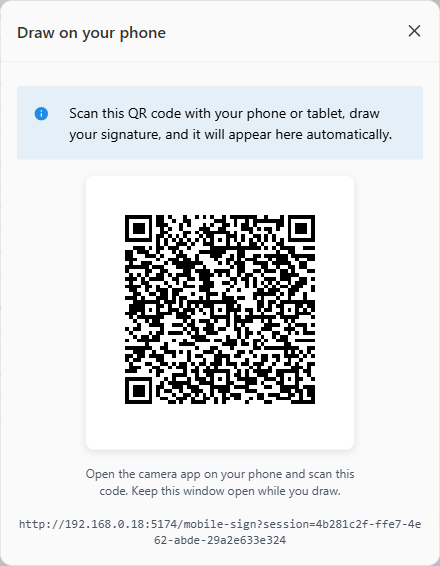 | 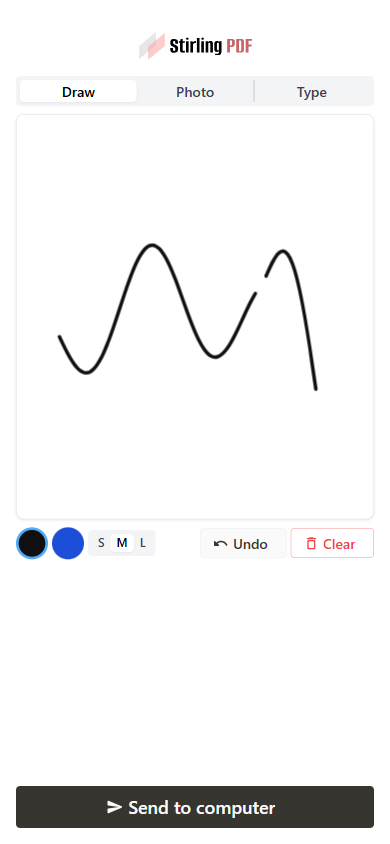 | 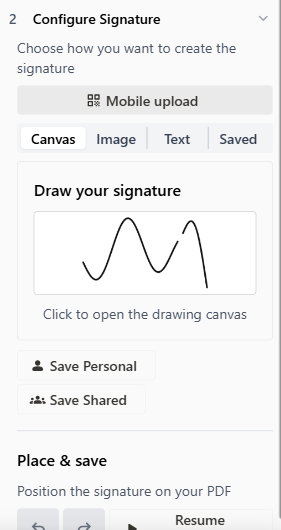 | ## How to test 1. Open the app on an address your phone can reach (not `localhost`), Sign tool → **Mobile upload**, scan the QR. 2. Draw → **Send to computer** → it becomes the active canvas signature and placement is live: click the PDF to place. 3. Photo tab → arrives in the Image source with a preview. Type tab → arrives editable in the Text source. 4. Flags: `enableMobileSignature: false` hides the button; signature still works with the scanner disabled. Verified end-to-end (all three kinds, portrait/landscape/tablet) plus `task frontend:check` and the touched backend tests. --- ## Checklist ### General - [x] I have read the [Contribution Guidelines](https://github.com/Stirling-Tools/Stirling-PDF/blob/main/CONTRIBUTING.md) - [x] I have read the [Stirling-PDF Developer Guide](https://github.com/Stirling-Tools/Stirling-PDF/blob/main/DeveloperGuide.md) (if applicable) - [ ] I have read the [How to add new languages to Stirling-PDF](https://github.com/Stirling-Tools/Stirling-PDF/blob/main/devGuide/HowToAddNewLanguage.md) (if applicable) - [x] I have performed a self-review of my own code - [x] My changes generate no new warnings ### Documentation - [ ] I have updated relevant docs on [Stirling-PDF's doc repo](https://github.com/Stirling-Tools/Stirling-Tools.github.io/blob/main/docs/) (if functionality has heavily changed) - [x] I have read the section [Add New Translation Tags](https://github.com/Stirling-Tools/Stirling-PDF/blob/main/devGuide/HowToAddNewLanguage.md#add-new-translation-tags) (for new translation tags only) ### Translations (if applicable) - [ ] I ran [`scripts/counter_translation.py`](https://github.com/Stirling-Tools/Stirling-PDF/blob/main/docs/counter_translation.md) ### UI Changes (if applicable) - [x] Screenshots or videos demonstrating the UI changes are attached (e.g., as comments or direct attachments in the PR) ### Testing (if applicable) - [x] I have run `task check` to verify linters, typechecks, and tests pass - [x] I have tested my changes locally. Refer to the [Testing Guide](https://github.com/Stirling-Tools/Stirling-PDF/blob/main/DeveloperGuide.md#7-testing) for more details.


