
Application UI Description
Checklist
- UI Structure
- Use Cases
- Menus and Functions
- Remote Control Keys
- Language Options
Samsung requirements
Entering Application Requirements
UI Structure
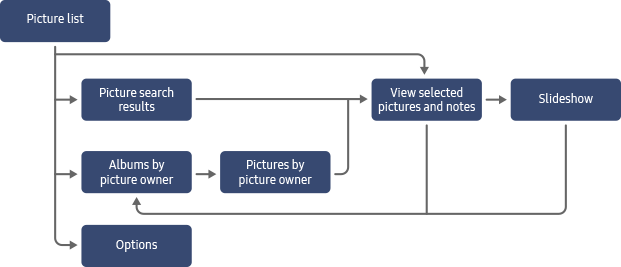
Use a flow graph, tree structure, or depth navigation diagram to illustrate the navigation between all screens in the application.
The UI structure diagram shows the overall structure of the application. It does not show or describe the content on individual screens.
Use Cases
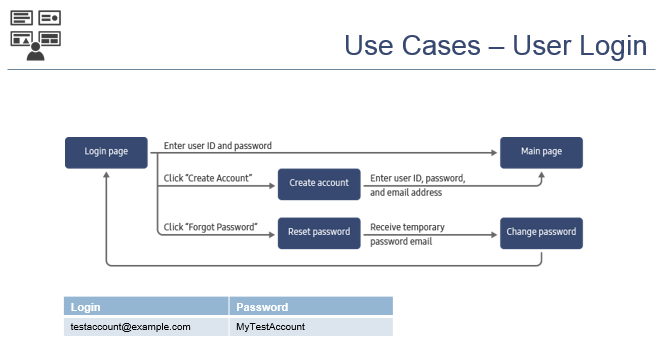
Describe the application functionality in detail, by dividing it into clear use cases. A use case is a specific and defined task the user can or must do, such as searching for content or playing a video. The use cases must cover the main functions or scenarios of the application. In addition to application-specific features, you must also describe any general user login, menu browsing, and in-app purchase features. Warning Do not provide a list of application screens, describing what the user can do on each screen. Such information must be provided using screenshots in the Menus and Functions section.
The following guidelines apply to use case descriptions:
Label each use case with a title.
For each use case, describe the steps the user must perform to do the task. You can use text, figures, and screenshots in the descriptions.
Since the launch process is the same for all applications, do not describe how to launch the application.
Refer to application screens with the names you have defined for them in the UI structure diagram.
Menus and Functions
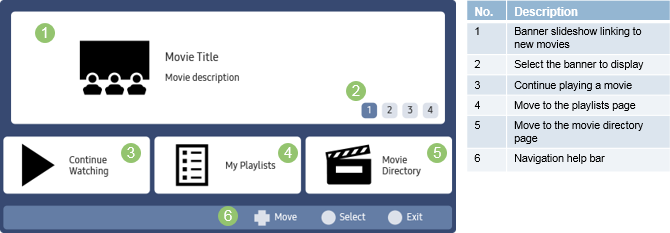
Use labeled screenshots to describe the UI elements and their functions on each application screen.
The following guidelines apply to menu and function descriptions:
Provide a screenshot of each screen defined in the UI structure diagram.
Label all clickable and non-clickable UI elements with names or numbers. If there are many elements, use number labels.
Accompany each screenshot with a table describing the UI elements. For clickable elements, describe what happens when the element is clicked.
Provide English translations for titles, headings, and button labels, if needed.