mirror of
https://github.com/jellyfin/jellyfin-meta.git
synced 2026-09-03 03:19:58 +03:00

Use Cases
Colaborative workspace
I have created a google slides HERE.
Overall Steps:
It has sections for flow, we can then export to png for upload to Samsung
Samsung requirement
Describe the application functionality in detail, by dividing it into clear use cases. The use cases must cover the main functions or scenarios of the application.
You can use text, figures, and screenshots.
Label each use case with a title.
Create as many slides as you need.
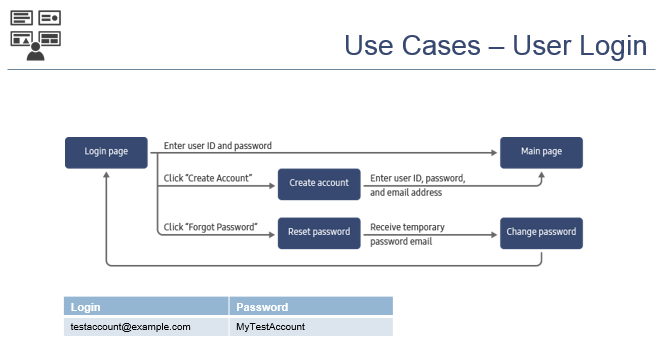
In addition to application-specific features, you must also describe any general user login, menu browsing, and in-app purchase features.
Example:
- From the home page, click the “Menu” key. The application menu appears.
- Select “Explore” and click “OK”. The application moves to the “Explore” page, which shows a category list.
- Select a category and click “OK”. The application moves to the category page, which lists the videos in that category.
- You can select a video for playback from the video list, or click “Back” to return to the category list.
Additional requirements
| Application Feature | Required Information(missing information causes application rejection) | NOTES |
|---|---|---|
| User login |
|
Demo link user = demo - password is blank Image Here |
| Device activation |
|
|
| In-app purchases |
|
|
| Gaming |
|
|
| Smart View mobile integration |
|
|
| Geolocation or IP-restricted access |
|
Project Response Section


